Most small business owners think of blogging as a treadmill: write a new post, publish it, write the next one, repeat. The treadmill is exhausting, and for most blogs it's also the slowest path to organic growth. The faster path is hiding in plain sight — the posts you've already published.
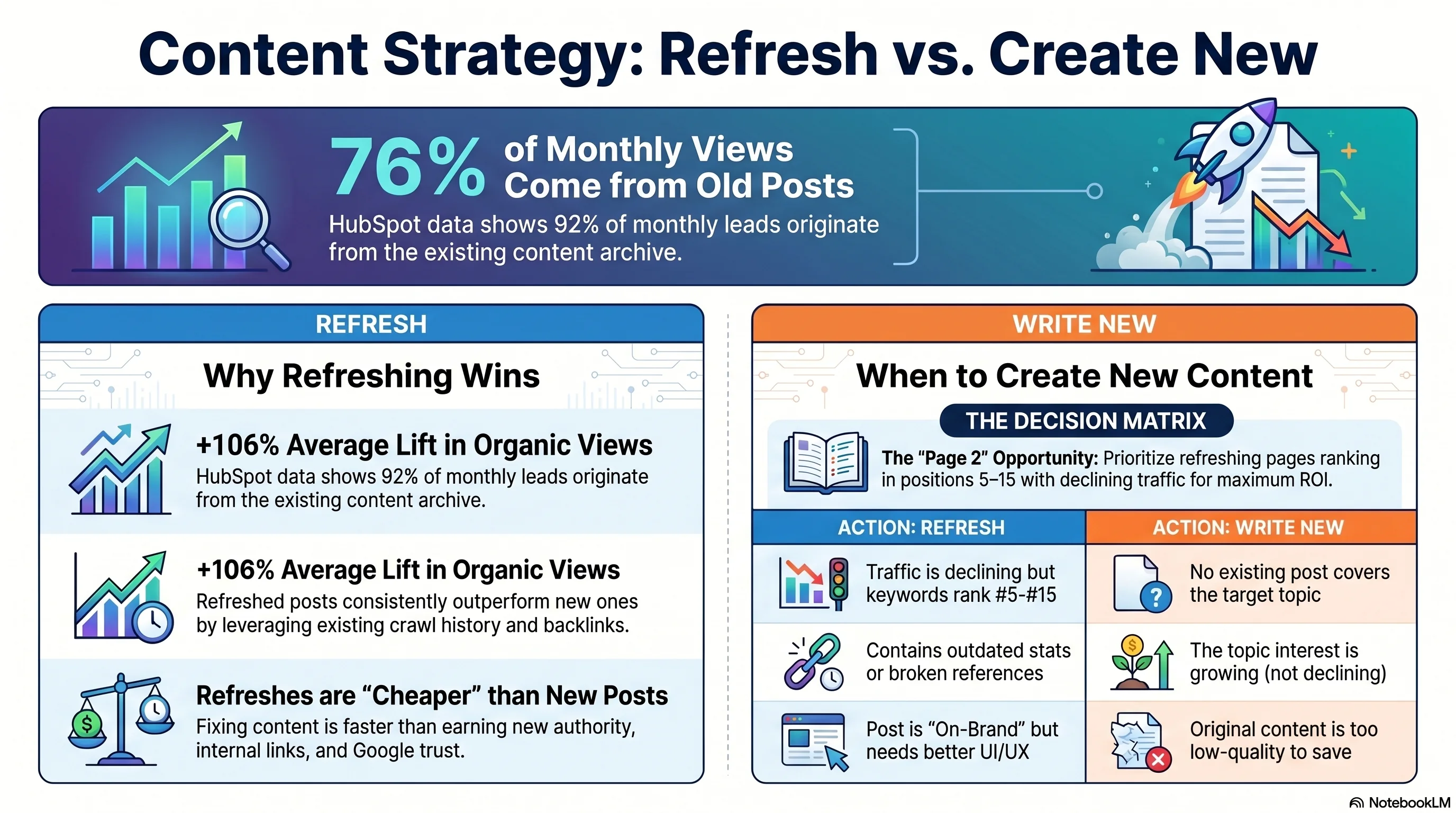
HubSpot's own attribution data is the cleanest proof of this. When their team analyzed where blog traffic and leads were actually coming from, they found that 76% of monthly blog views and 92% of monthly leads came from posts published before the current month — the "old" archive, not the new releases. Even more striking: 46% of all monthly leads came from just 30 posts out of roughly 6,000.[1] A handful of old posts were carrying the entire blog. Once HubSpot started systematically refreshing those posts instead of just writing new ones, refreshed posts saw a 106% average lift in monthly organic search views and 2× the monthly leads.[1]
This guide is the small-business playbook for that exact pattern. We'll cover when refreshing beats writing new (and when it doesn't), how to find the posts worth refreshing, what to actually edit, real case studies with named data, a 10-point scoring rubric you can run in a spreadsheet, the eight mistakes that quietly tank refresh ROI, and the honest answer to the question every blog owner asks: "Can I just change the publish date?"
The Data: Why Refreshes Often Beat New Posts
Five publishers, one consistent pattern — refreshing existing pages outperforms writing new ones per hour of work
Five named publishers have published refresh data with hard numbers. Read together, they tell the same story.
HubSpot. The historical optimization program (Pamela Vaughan, 2015 onward, republished 2025-06-13): 76% of views and 92% of leads from old posts; refreshed posts gained +106% organic search views on average and doubled monthly leads. One post — "how to write a press release" — got a +240% conversion-rate lift after a single keyword-driven refresh.[1]
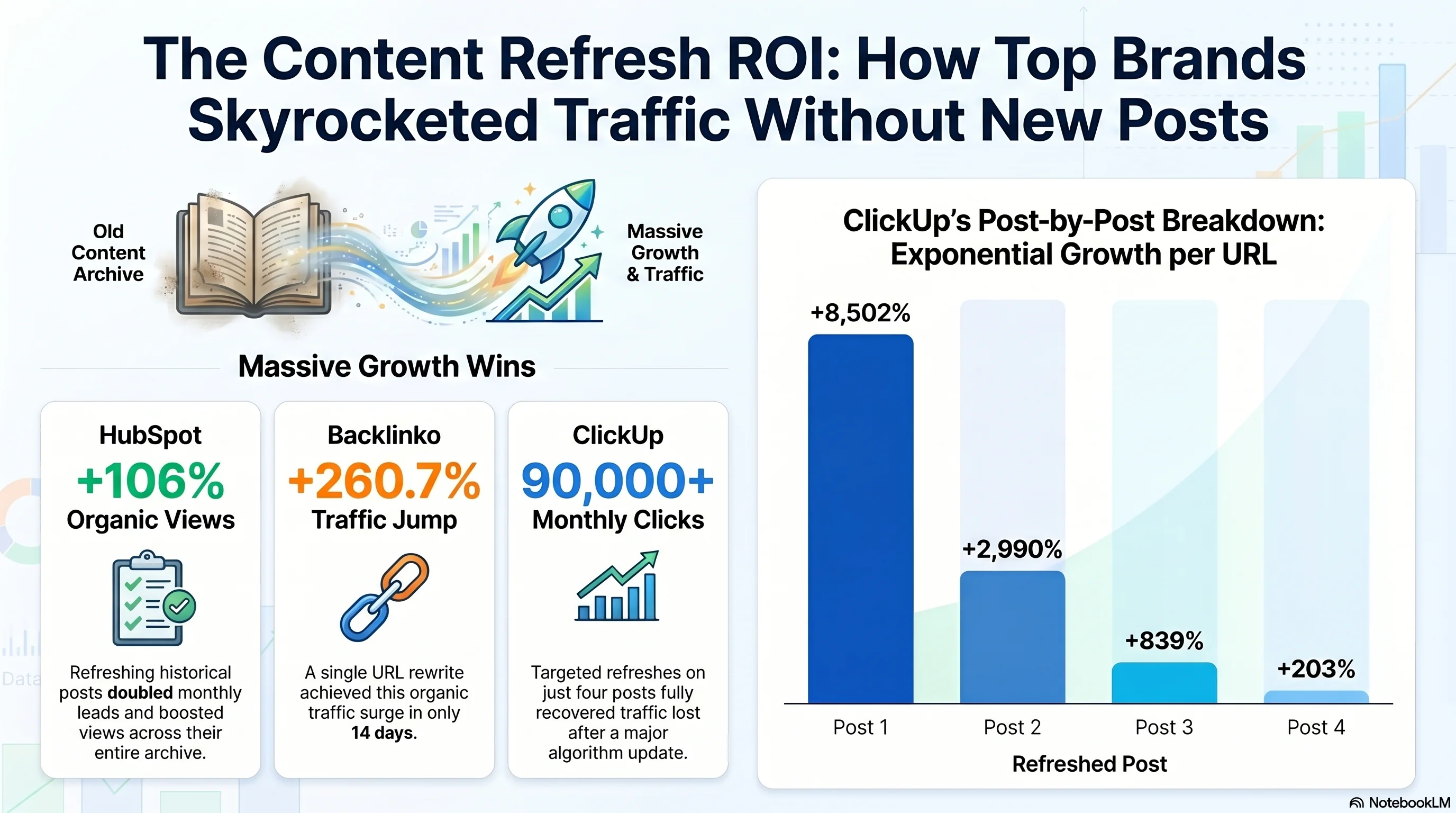
Backlinko. Brian Dean rewrote a single white-hat-SEO case study using HubSpot's playbook and reported +260.7% organic search traffic in 14 days on that one URL, plus a jump from position #7 to #4 on the target keyword.[3] The page also picked up new backlinks because the relaunch put it in front of a fresh audience.
Ahrefs. Despina Gavoyannis published Ahrefs' own refresh numbers in November 2025: a 2018 link-reclamation post that had never broken ~350 monthly visits saw traffic triple after an August 2024 rewrite. A separate "On-Page SEO" post got +36% organic traffic.[4] A different Ahrefs piece by Si Quan Ong reported +142% page views from a single afternoon's refresh using Ahrefs' AI Content Helper.[5]
AdEspresso / Animalz. Animalz tracked weekly pageviews on a refreshed Instagram-ad-costs post over 66 weeks: pre-refresh average 1,111 pageviews/week, post-refresh average 1,733/week — a +55% lift, worth roughly +30,000 cumulative pageviews versus the projected decay curve.[7] Animalz' broader research found that refreshed articles can recover 50–90% of lost traffic within 3–6 months.[8]
ClickUp. The single most dramatic case in the public record. After the March 2024 Google core update, ClickUp lost 39.5% of its organic traffic in three weeks. They picked four posts to refresh. Between May and November 2024, the four URLs combined recovered more than 90,000 extra clicks per month.[9]
Case Study Results — % Organic Traffic Lift
Reported organic-traffic lifts from named publisher refreshes (median lift on the refreshed URL)
Sources: HubSpot [1], Backlinko [3], Ahrefs [4][5], Animalz [7]. ClickUp shown separately below.
The pattern is mechanical, not mystical. Refreshes outperform new posts because the existing page already has crawl history, internal links, and (often) backlinks that Google has already weighted. New posts have to earn all of that from scratch — usually over months. A page sitting at position #8 with real impressions in Search Console is rarely an authority problem; it's a content problem, and content is the cheapest thing to fix.
Three other tailwinds quietly favor refreshes. First, Google's Query Deserves Freshness (QDF) system actively boosts recently updated content for queries where freshness matters — and a refresh is exactly the kind of update QDF was designed to detect. Second, AI search assistants cite fresher content; Ahrefs' fresh-content study found AI-cited URLs are 25.7% "fresher" than equivalent SERP URLs, and ChatGPT/Perplexity tend to order their citations newest-first.[6] Third, HubSpot's data on volume concentration — 30 posts driving 46% of leads — applies even more intensely to small business blogs with 50–500 posts. Your top 10 posts almost certainly produce the majority of your traffic. Those are the refresh candidates.
Insight
Traffic Per Hour Invested — New Post vs Refresh
Illustrative ranges; small-business medians grounded in HubSpot, Backlinko, and Animalz published data
Methodology: visits-per-hour ratios derived from HubSpot historical optimization average lift [1], Backlinko relaunch case study [3], and AdEspresso/Animalz +55% weekly lift [7]. Ranges illustrative.
Refresh or Write New? A Decision Framework
Not every old post deserves a refresh, and not every gap deserves a new post. Here's how to choose.
A small business owner shouldn't refresh everything. Some posts deserve to die. Others would be better consolidated into a stronger page. The simplest decision tree:
Refresh when:
- The post used to rank or drive traffic and has declined ≥30% over 3+ consecutive months (Animalz' canonical threshold).
- Average rank is between #5 and #15 for a keyword with real search volume — the page-2 sweet spot Backlinko built its relaunch playbook around.
- The post has earned backlinks and accounts for at least 1% of total content traffic (Animalz' rule-of-thumb for "worth refreshing first").
- The topic is evergreen but contains outdated stats, dates, screenshots, or product references that quietly erode trust.
- A competitor outranking you has clearly newer content — check the SERP, see what's beating you, and ask whether your post is recognizably "old."
- The post's search intent has shifted — for example, the SERP now shows AI Overviews or shopping packs at the top, and your text-only essay no longer matches what wins.
Write new when:
- No existing post targets the keyword. There's a real content gap, and a refresh has nothing to refresh.
- The intent is fundamentally different from anything you have — for example, you have a "how to" piece but the keyword needs a "best of" listicle.
- The topic is in genuine decline and search volume is trending toward zero. No refresh saves a dying topic; the right move is to kill or consolidate.
- The original post is so thin or off-brand that the rewrite would functionally be a new post anyway. In that case, write the new one and 301-redirect the old URL into it rather than maintaining both.
HubSpot's discovery rule sets the order of operations: 46% of leads came from 30 posts out of ~6,000. For a small business with 50–500 posts, the concentration is even higher. Audit, identify your top 10–20 traffic and lead drivers, refresh those first. Writing new posts comes second — and ideally the new posts you do write are designed to internally link into the refreshed pillar pages, compounding the value of both at once.
Recommendation
The Audit Framework: 6 Signals a Post Needs a Refresh
The signals that tell you a page is ready for a refresh — in priority order, with concrete thresholds
An audit is the unglamorous part of the work, and it's where most small businesses skip straight to the wrong post. The six signals below are listed in priority order. A post hitting two or three of them is a strong candidate; a post hitting four or more should jump the queue.
| Signal | Threshold | Why it matters |
|---|---|---|
| Traffic decline | ≥30% drop over 3 months (or ≥50% over 6) | The single strongest signal. Animalz' Revive tool flags 3+ consecutive months of decline as the canonical refresh trigger — pages that used to earn meaningful traffic and have started slipping. |
| Position 5–15 in Google | Average rank between 5 and 15 with real impressions | Page-2 opportunities. Per Backlinko's CTR data, positions 1–5 capture roughly 67.5% of all clicks — a single refresh that moves you from #8 to #3 can multiply your traffic on that keyword 4× to 6× without any new backlinks. |
| Outdated stats, dates, or '20XX' in the title | Any stat older than ~24 months; year in title 2+ years stale | Bleeds CTR and trust simultaneously. A title saying '2022 guide' in 2026 actively repels clicks even when the post still ranks. This is the cheapest fix on the list. |
| Broken or stale references | Dead outbound links, deprecated tool screenshots, missing examples | Ahrefs notes that outdated examples and old data 'are a great way to build a negative brand perception.' Readers see expired UI and assume the whole post is expired with it. |
| SERP intent or format shift | AI Overview, video carousel, or shopping pack now dominates the SERP | If Google has restructured what wins for your target keyword and your post is still a 2,000-word essay where competitors are answering with Q&A, lists, or video, the format itself needs a refresh — not just the words. |
| Featured snippet loss | Used to own a snippet, no longer do | Snippets are won and lost on structure. Restructuring with a definitive 40–60-word answer paragraph near the top is one of the highest-ROI edits in this entire list. |
Sources: Animalz refresh thresholds [7][8], Backlinko CTR/positioning data [3], Ahrefs republishing guide [4].
The single best place to start: open Search Console, sort your pages by "average position," and filter to anything between 5 and 15. Cross-reference that list with pages that have been declining over the last 90 days. The intersection — page-2 keywords on declining pages — is where a 2-hour edit can produce a multiple of its own ROI.
The CTR math behind that recommendation is worth seeing in one chart. The numbers below come from Backlinko's analysis of Advanced Web Ranking CTR data — they're illustrative for any individual industry, but the relative ratios hold remarkably well across niches.
CTR Multiplier — Moving a Refreshed Page to Position #3
Estimated CTR multiplier when a refresh promotes a page from a lower position to #3 (~10% CTR)
Methodology: CTR estimates from Advanced Web Ranking data cited via Backlinko [3]. A move from #15 to #3 represents roughly a 10× CTR uplift on the same impression volume.
What to Actually Change in a Refresh
The edit checklist most 'just change the date' articles get wrong
This is the part of refresh strategy that tends to be either wildly oversimplified ("change the date") or unhelpfully vague ("update the content"). The Ahrefs and Backlinko playbooks — different publishers, similar conclusions — converge on a specific set of elements. We're going to walk them in priority order.
Headline / title tag
Re-test your title against the live SERP. If competitors now have "(2026 Guide)" appended to theirs and yours says "(2022)," update — or, better, remove the year entirely and commit to refreshing annually. One thing you absolutely never do: change the URL slug. The slug is the single most expensive thing to break. We'll cover why in the Mistakes section.
Intro / first 100 words
The intro is where you bake in E-E-A-T signals (experience, expertise, authoritativeness, trust) and the search-intent hook. ClickUp's recovery playbook, documented by Eleven Writing, found that rewriting intros in first-person with hands-on experience was one of the changes that contributed to its post-core-update recovery.[9] Generic, third-person, "in this article we will cover" intros are exactly what a refresh should replace.
Statistics and data
Replace any stat older than ~24 months with current data, and cite the source plus the access date. This single change disproportionately helps your refresh because:
- Other writers re-link to your post when you have the freshest stat in the niche — backlinks compound.
- AI assistants cite fresher content. The Ahrefs fresh-content study found AI-cited URLs trend 25.7% fresher than SERP URLs.[6]
- Readers stay on the page longer when the data feels current. Dwell time and engagement are weak ranking signals on their own, but they compound with everything else.
Internal links — pointing into the refresh
This is the most under-used tactic on the list. When you publish new posts on related topics, link from those new posts back to the refreshed one. The flow of fresh PageRank into a refreshed page re-signals importance to Google in a way that on-page edits alone don't. HubSpot's "topic clustering" approach is exactly this pattern, formalized: pick a pillar post, refresh it, then make sure every new post you write on related subtopics links back.
Publish date — the honest answer
Just changing the date does not improve rankings. Google's John Mueller confirmed this publicly in 2017, in response to a Pieter Levels tweet about Fast Company's date-bumping practice:
"These are old tricks :)"— John Mueller, Google, on faking publish dates (Twitter, 2017-08-28, cited via Search Engine Roundtable[10])
Eight years later, the position has hardened. Mark Williams-Cook, cited in Ahrefs' 2025 republishing guide, put it bluntly:
"Google also has a binary trust signal when it comes to things like lastmod. So abuse it if you want to lose it."— Mark Williams-Cook, cited in Ahrefs, 2025-11-10[4]
Google knows when a URL was first discovered, when content first appeared on it, and when it actually changed — independent of any datePublished tag you set. The tag is one signal among many, and a tag that contradicts the content is a trust problem, not a ranking lever.
Schema (datePublished vs dateModified)
Google's Search Central documentation is specific: use Article or BlogPosting schema with both datePublished and dateModified fields, both in ISO 8601 format, and make sure the on-page visible date and the schema date agree.[11][12] If you only made minor edits, keep datePublished as the original and just bump dateModified. This is the technically correct way to signal "this page was updated" without lying about when it was first written.
Images and screenshots
Backlinko's relaunch playbook lists image swaps near the top of its checklist for a reason: screenshots that visibly date the post (old Twitter UI, deprecated dashboards, products that no longer exist) tell readers — and Google — that the page hasn't been touched in years. Compress, add descriptive alt text, prefer modern formats like WebP or AVIF, and treat image freshness as part of the refresh, not an afterthought.
Add what's actually new
The strongest refreshes don't just polish what's there — they add something the original lacked. ClickUp's recovery refreshes added "Quick Glance" comparison tables, third-party user-review quotes, and personal first-person experience.[9] Those are exactly the EEAT signals Google's review-content guidelines reward: "Demonstrate that you are knowledgeable about what you are reviewing — show you are an expert." Comparison tables, real screenshots from your own use, named first-person stories — these are the additions that turn a refresh from a tune-up into a relaunch.
The full edit checklist, sorted by how often you should touch each element on a typical refresh:
| Element | Action | Frequency |
|---|---|---|
| Headline / title tag | Re-test against the live SERP. Update the year if dated, mirror competitor framing where stronger. Never change the URL slug. | Always |
| Intro / first 100 words | Rewrite in first-person with hands-on experience. Bake in E-E-A-T signals and the search-intent hook in the opening lines. | Always |
| Statistics and data | Replace anything older than ~24 months with current data, cite the source and access date. Fresh stats are why other writers re-link to your post. | Always |
| Internal links — pointing in | Edit 3–5 newer related posts to link back to the refreshed page. Sends fresh PageRank flow and re-signals importance to Google. | Always |
| Visible publish date | Only update if substantive changes were made. Otherwise leave the original date and surface a 'Last updated' line instead. | Often |
| Schema (datePublished + dateModified) | Keep datePublished as the original. Bump dateModified in ISO 8601. Make schema, visible date, and content tell one story. | Always |
| Images / screenshots | Replace screenshots that visibly date the post. Compress, add descriptive alt text, prefer modern formats (WebP/AVIF). | Often |
| Add what's actually new | Comparison tables, third-party review quotes, first-person experience notes — the EEAT signals Google's review-content guidelines reward. | Often |
| Featured-snippet structure | Add a 40–60-word definitive answer paragraph near the top, structured as a direct response to the target query. | If applicable |
Real Case Studies: What Refreshes Actually Deliver
Seven named, dated, sourced refreshes — and the realistic range a small business should expect
The case studies below are the ones with public, named numbers and dates. They give a realistic range for what a small business should expect from a well-executed refresh.
| Case | Refresh action | Result | Window |
|---|---|---|---|
| HubSpot blog program | Keyword optimization + republish on prioritized old posts | +106% organic views avg; 2× leads; +240% conversion on a single post | Ongoing since 2015 |
| Backlinko white-hat-SEO post | Full relaunch — new screenshots, new case study, storytelling, outreach | +260.7% traffic; #7 → #4 ranking | 14 days |
| Ahrefs link-reclamation post | Full rewrite + republish | Traffic 3× | Aug 2024 onward |
| Ahrefs On-page SEO post | Update | +36% organic traffic | n/a |
| Ahrefs (AI Helper) | Topical gap fill | +142% page views (+2.2K) | One afternoon |
| AdEspresso / Animalz | Refresh + relaunch | +55% weekly pageviews; +30K cumulative | 66 weeks |
| ClickUp post-update | EEAT rewrite + comparison tables on 4 posts | +90,000 monthly clicks combined; up to +8,502% on a single URL | May–Nov 2024 |
Sources: HubSpot [1], Backlinko [3], Ahrefs [4][5], Animalz [7], Eleven Writing on ClickUp [9].
The realistic range from these studies: a well-chosen, properly executed refresh on a small-business blog typically delivers +30% to +250% organic traffic within 30–90 days. Outliers — especially post-algorithm-update recovery and page-2-to-page-1 jumps on competitive keywords — can hit 800% or more, but those should not be promised as a median outcome.
The ClickUp case is worth seeing in one chart, because it's the single best small-business analog: an established site that lost traffic to a Google update and recovered most of it through targeted refreshes — not new posts.
ClickUp Refresh Impact — 4 Posts, May–Nov 2024
Per-post % organic-clicks lift after refresh, post-March-2024 core update
Source: Eleven Writing case study on ClickUp's recovery [9]. Combined: 90,000+ extra clicks/month from four refreshes.
After the March 2024 Google core update, ClickUp lost 39.5% of its organic traffic in three weeks (April 8 – May 1, 2024). The team picked four blog posts to refresh. The refreshes shipped between May and November 2024. The results, as documented by Eleven Writing:[9]
- "25 Best Free Project Management Software" — 2,707 → 25,428 monthly clicks (+839%). Refreshed mid-2024.
- "20 Best Task Management Software" — 975 → 30,129 monthly clicks (+2,990%).
- "15 Best Project Management Tools" — 176 → 15,140 monthly clicks (+8,502%). The largest individual lift.
- "20 Best ChatGPT Alternatives" — 11,937 → 36,177 monthly clicks (+203%). Refreshed after the August 2024 update; recovered in roughly three weeks.
The combined gain across the four URLs was more than 90,000 extra clicks per month. The refreshes added Quick Glance comparison tables, first-person experience notes, and third-party user-review quotes — exactly the EEAT signals Google's review-content guidelines describe. None of the four URLs changed slugs. None of the four faked the publish date.
The 10-Point Refresh Scoring Rubric
A weighted scoring system you can run in a spreadsheet to prioritize refresh candidates
Score each candidate post 0–10 on each criterion below; multiply by the weight; sum to get a weighted total. Refresh candidates with a weighted total ≥ 60 first. The rubric is designed so a small business with 50–500 posts can run it in an afternoon using only Search Console and a free rank tracker.
| Criterion | Weight | What to look for |
|---|---|---|
| Traffic delta (decline) | 15% | Has organic traffic dropped ≥30% over the last 3–6 months from its peak? Bigger declines on previously high-traffic posts score highest. |
| Current rank position | 15% | Position 5–15 = highest leverage. Position 1–4 = leave alone unless stats are wrong. Position 30+ = consider full rewrite or kill instead. |
| Keyword search volume | 10% | Is the target keyword still searched? At least 100 searches/month for it to be worth your time at small-business scale. |
| Backlinks / link equity | 10% | Does the page already have referring domains? Refreshing protects existing link equity that a new post would have to earn from scratch. |
| Conversion potential | 10% | Does it (or could it) connect to a relevant offer, lead magnet, or product page? Pages with a path to revenue score higher than pure-information posts. |
| Outdated content score | 10% | Stats >24 months old; year in title; dead screenshots; deprecated tools mentioned. The more stale signals stacked, the higher the score. |
| SERP intent shift | 10% | Has the SERP added AI Overviews, videos, shopping packs, or a new dominant format your post doesn't match? |
| Snippet / SERP feature opportunity | 5% | Featured snippet, People Also Ask, or AI Overview citation potential the post is currently missing. |
| Internal link surface | 5% | How many internal links already point to this post? More inbound internal links = stronger refresh ROI per hour invested. |
| Effort cost (inverted) | 10% | Inverted — how cheap is the fix? A Quick Update (2 hrs) scores high; a full rewrite (2 days) scores low unless other factors compensate. |
Two practical tips for running the rubric in a spreadsheet. First, export Search Console "Pages" data and join it with your rank tracker (Ahrefs Webmaster Tools is free and good enough for sites under a few thousand pages). Second, score in batches — 20 posts at a time over three or four sittings — instead of trying to score 200 posts in one afternoon. Refresh fatigue is a real thing, and you'll start mis-scoring when you're tired.
8 Common Refresh Mistakes
The patterns that quietly tank refresh ROI — most of them avoidable in five minutes
Most refreshes don't fail dramatically. They underperform quietly, and the post owner concludes "refreshing doesn't work" when what really happened is one of the eight patterns below.
#1: Just changing the publish date
Why it hurts: Google's John Mueller called this 'an old trick' in 2017 and detection has been in place for years. Mark Williams-Cook (2025) calls lastmod 'a binary trust signal — abuse it if you want to lose it.'
The fix: Only republish dates when you actually rewrote ≥25% of the body. Otherwise update dateModified only and surface a visible 'Last updated' line.
#2: Deleting useful content because it 'feels old'
Why it hurts: Often what made the post rank in the first place is exactly what you're tempted to cut. Stripping word count to look modern frequently nukes the topical coverage that earned the rankings.
The fix: Improve, don't strip. Add new sections, modernize stats, replace examples — but keep the depth that competitors are still imitating.
#3: Over-optimizing the refresh
Why it hurts: Stuffing keywords, swapping examples for AI-generated boilerplate, and inflating word count all hurt. ClickUp's recovery happened because they made content more human, not more SEO'd.
The fix: Bring real first-person experience to the rewrite. Read your draft out loud — if it sounds like SEO content, it is.
#4: Breaking the URL structure
Why it hurts: Changing the slug for 'cleaner SEO' guarantees you'll lose 5–15% of link equity in transit, even with a perfect 301 redirect, plus weeks of re-crawling instability.
The fix: Never change the slug for SEO reasons. If a migration genuinely requires it, do it once with full 301 mapping and accept the cost.
#5: Refreshing without measuring
Why it hurts: If you don't tag the refresh date, you'll never know which edits worked. The whole feedback loop collapses and you end up doing the same things on every refresh.
The fix: Add a custom annotation in GA4 or a note in Search Console on the day you ship the refresh. Compare 30 / 60 / 90 days against the prior baseline.
#6: Refreshing dying topics
Why it hurts: If the keyword's search volume is trending toward zero, no refresh saves it. You're putting effort into a page whose ceiling is collapsing.
The fix: Kill or consolidate. Redirect dying-topic posts into a stronger evergreen page that absorbs their link equity.
#7: Schema mismatch
Why it hurts: Visible date says 'Updated April 2026' but datePublished schema says 2019 with no dateModified field. Google reads contradictory signals and trusts the page less.
The fix: Pick one truth. Schema, visible date, and body content should all agree. Use ISO 8601, populate dateModified when content actually changed.
#8: Skipping the promotion
Why it hurts: Backlinko's +260.7% relaunch lift was not all on-page edits — Brian Dean emailed his list (7,000+ clicks) and tweeted at outreach contacts. A refresh with no distribution does half the work.
The fix: Treat every meaningful refresh like a launch. Email subscribers, post on social, notify the original sources you cited, and link from your newest posts.
Warning
The Republish-Date Question, Answered Honestly
When you can update the visible date, when you can't, and what Google actually rewards
The "can I just change the date?" question is the most common single thing small business owners ask about refreshes — and most of the answers floating around the SEO internet are either dishonest or out of date. Here is the cleanest framework, which 2025-era SEO consensus across Ahrefs, Search Engine Land, and John Mueller's public statements all agree on.
If you rewrote ≥25% of the body, replaced major sections, or substantially updated stats: update both the visible "Last updated" date and the dateModified schema field. Do not touch datePublished. This is honest, technically correct, and Google rewards it.
If you only fixed typos, swapped one screenshot, or refreshed a single stat: leave the date alone. Don't pretend you did more than you did. Google's freshness models specifically catch this pattern, and over time they erode trust in the rest of your domain.
Never change datePublished to today's date on an old post. That is the trick John Mueller called out in 2017, and the one that the 2025 "binary trust signal" framing from Mark Williams-Cook explicitly references. It works briefly, then it stops working, and the recovery is slow.
Annual evergreen updates ("Best [Tool] for 2026"): legitimate to update both dates if — and only if — you actually re-vetted the content for the new year. If your "2026 guide" still references 2021 stats and 2022 product screenshots, you've created a trust gap your readers will notice in seconds.
Google's Search Central documentation specifies that Article, NewsArticle, and BlogPosting structured data should include both datePublished (when the article was first published) and dateModified (when it was last meaningfully changed) in ISO 8601 format — for example "2024-04-27T08:00:00+01:00".[11]
Google's 2019 Search Central blog post on date signals is equally specific: the on-page visible date that humans see should match the schema dates, both should agree with the actual content, and "the same date should be used wherever the date is shown."[12] Mismatches between visible date, schema, and content are the exact contradictory signals Google's freshness models flag.
Practical implementation on common platforms:
- WordPress + Yoast / Rank Math: both plugins automatically populate
datePublishedanddateModifiedfrom the post's published-date and last-modified-date fields. If you only edit content (not the publish date), schema updates correctly without you doing anything. - Shopify / Squarespace / Webflow: blog posts emit Article schema with both fields automatically; check via the Rich Results Test that both populate as you expect.
- Custom stacks: in your blog post template, render
"datePublished": "{original publish date in ISO 8601}"and"dateModified": "{last edited at, ISO 8601}", and surface a "Last updated: [date]" line in the visible UI when the two differ by more than a day.
The ethical line is the simplest rule of all: the visible date should match what a reader would conclude after reading the post. If a reader sees "Updated April 2026" and the body still references 2021 stats, you've eroded trust — and trust is the whole asset you're trying to build.
Where AI Publishing Fits Alongside Refresh Work
The pragmatic split between automated new-content cadence and human-led refresh effort
Content refresh strategy works best when you have a backlog of indexed pages to update — but that backlog only exists if something keeps publishing new posts in the first place. That's where AI publishing tools fit alongside refresh work, not in place of it.
News Factory's agentic automation (Pro tier and above) lets autonomous AI agents discover trending stories in your niche, research them, and draft full articles on a schedule you define — with the choice to approve every post before it goes live or let the AI run fully autonomous. The practical split: let AI handle the steady cadence of new posts so your blog stays active and the index keeps growing, and spend your human editorial hours on the high-leverage refreshes of pages that are already ranking on page two or losing traffic.
The math behind the split is the same math we've been running for the last 3,000 words. New posts are how you build the archive. Refreshes are how you turn the archive into traffic. Most small business owners are out of editorial hours long before they reach the refresh part — which is why the highest-ROI pages on their blog are the ones nobody ever has time to revisit. Automating one half of the equation buys back the time the other half needs.
If that split makes sense for how your team is set up, News Factory starts at $20/month, with agentic automation unlocked from $90/month (Pro, annual). The refresh strategy in this guide works without any tool — and we'd rather you ship a refresh this week than start a new subscription. The two are complementary, not competitive.