Why Schema Is The Cheapest CTR Win In SEO
Not a ranking factor. A presentation factor. And it's the cheapest one Google offers.
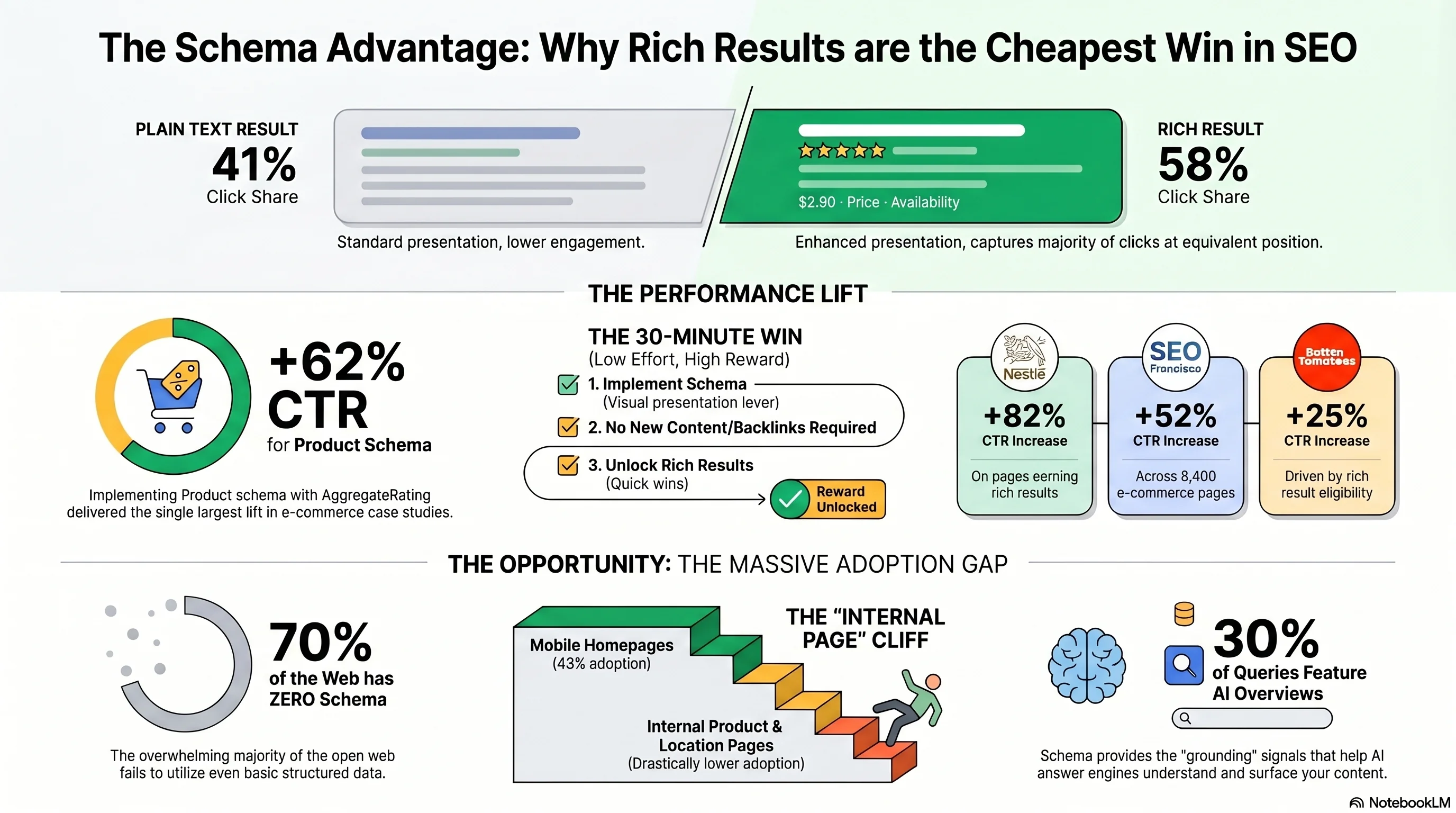
If you run a small business website and you've never heard the words "JSON-LD" or "schema.org" before, you are in the overwhelming majority. Roughly 70% of the open web ships zero schema markup, according to industry estimates aggregated from Searchmetrics and Target Internet.[10][12] The HTTP Archive's Web Almanac is slightly more generous — it found JSON-LD on 43% of mobile home pages in 2024[12] — but home pages are the easiest case. Internal pages, product pages, blog posts, location pages? The rate falls off a cliff.
This is one of the strangest underserved opportunities in SEO, because schema is genuinely close to free. It costs you no new content, no backlinks, no Core Web Vitals work, no domain authority. You add a small JSON-LD block to your <head> and Google's parser does the rest. Yet sites keep skipping it.
Before going further, the most important framing in this entire article:
Schema is not a ranking factor — and Google has been crystal clear on this
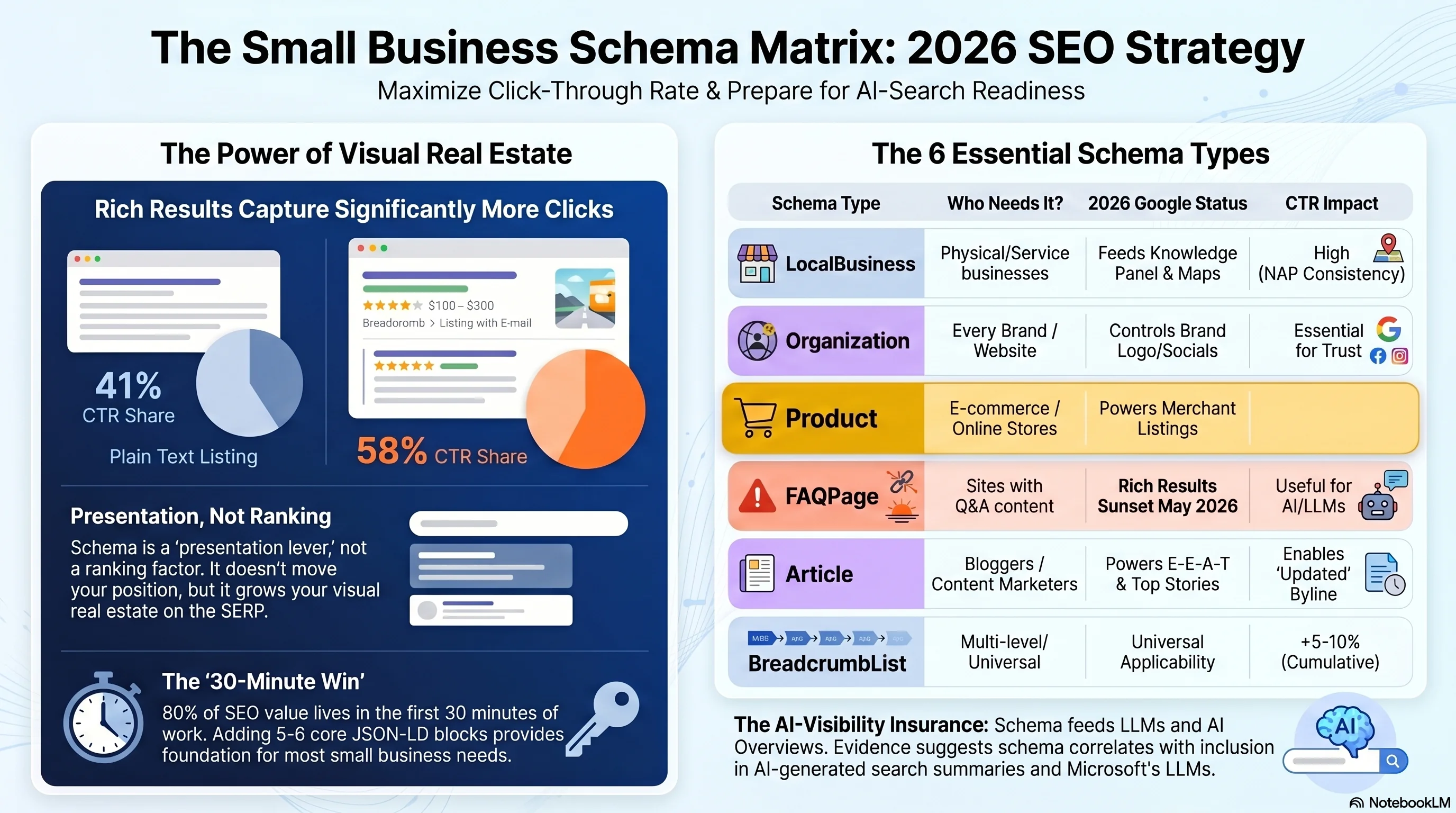
The reason that matters: SEO advice that promises "schema will boost your rankings" is wrong, and the disappointment that follows is why a lot of small business owners give up on it. Schema doesn't change where you appear. It changes how you appear. And the second one is the difference between a 41% and a 58% share of clicks at the same SERP position.
The 58/41 number is the cleanest published comparison. SERPClix's aggregated data, picked up by the KeyStar Agency benchmark, finds rich results capture 58% of all clicks on a typical SERP versus 41% for plain text results at equivalent positions.[10] Think about that asymmetry on your own queries: if you rank position 3 and the position-1 result has no rich markup, you can collect more clicks than the listing physically above you. That's the whole reason this article exists.
Adding more numbers to the case: SEO Francisco's 8,400-page e-commerce case study deployed schema across an entire catalogue and measured a +52% average CTR lift and +41% increase in organic clicks — with no ranking change at all.[9] Google's own customer case studies, recycled through several agency aggregators, claim Rotten Tomatoes saw +25% CTR, Food Network +35% visits, and Nestlé +82% CTR on pages that earned rich results.[10] Treat the Google-syndicated numbers with caution — they're corporate marketing, not independent measurement — but the SEO Francisco study has page counts, methodology, and a real before-and-after.
Here's the practical mental model for the rest of the post. You are going to add five or six small JSON-LD blocks to your site. Each block unlocks one rich result. The 30 minutes in the headline buys you the foundation — the rich results that actually move the needle for a small business. Beyond that, the optimisation work is incremental and ongoing, but the 80% of the value lives in the first half-hour of work. Let's do it.
The 6 Schema Types Every Small Business Needs
Six types cover ~90% of small-business use cases. Everything else is specialist.
Schema.org has roughly 800 types. You do not need 800. For a small business, six cover almost every meaningful use case: LocalBusiness, Organization, Product, FAQPage (with a caveat), Article / BlogPosting, and BreadcrumbList. The table below is the reference card.
| Schema type | Who needs it | Google status (2026) | CTR impact |
|---|---|---|---|
| LocalBusiness (+ subtype) | Any business with a physical address or service area (Restaurant, Plumber, Dentist, HairSalon, Hotel) | Fully supported — feeds knowledge panel, local pack, Maps, hours, directions | Indirect: drives local-pack inclusion and knowledge-panel real estate |
| Organization (or OnlineStore) | Every site. Disambiguates your brand from similarly-named businesses; powers logo, sameAs social links, brand SERPs | Fully supported — adds shipping/return-policy fields for OnlineStore subtype | +10–15% on brand-name SERPs |
| Product (+ Offer + AggregateRating) | Anyone selling a discrete product — Etsy seller, indie SaaS one-time license, 50,000-SKU retailer | Fully supported — product snippets AND merchant listings (with stricter price/return data) | +30–35% with stars and price |
| FAQPage | Historically: any page with Q/A. Today: AI surfaces only — Microsoft confirmed; Google declined to comment | DEPRECATED for Google SERPs as of May 7, 2026. Still valid schema.org markup; useful for LLMs | 0% in Google. Possible lift in AI Overviews / Bing Copilot / ChatGPT citations |
| Article / BlogPosting | Anyone with a blog or content marketing motion — almost every small business | Fully supported — Top Stories, byline date, Discover. Carries E-E-A-T author/publisher fields | +8–12% from byline date and sitelinks |
| BreadcrumbList | Every site with more than two levels of navigation — Services › Plumbing › Boiler Repair | Fully supported — replaces URL string in SERP with readable hierarchy | +5–10% per page, universally applicable |
LocalBusiness — the foundation for any business with a physical or service-area presence
LocalBusiness is the single most important schema type for a small business — and the one most often skipped or implemented wrong. It tells Google your name, address, phone, hours, location, and category, which in turn feeds the knowledge panel, the local pack, and Google Maps. Google's documentation explicitly recommends placing it on the home page or a contact / about page, not on every page on the site.[1]
The most expensive mistake: using the generic LocalBusiness type when a specific subtype exists. Plumber, Restaurant, Dentist, HairSalon, Locksmith, HomeAndConstructionBusiness — Google explicitly recommends the most specific schema.org subtype available. The second most expensive: mismatching NAP (Name / Address / Phone) between your schema, your Google Business Profile, and the visible text on the page. Google's structured-data policies require the markup to match what users see; mismatch is one of the easiest paths to a manual action.
Organization — for every site, even if you also have a LocalBusiness
Organization disambiguates your brand from other businesses with similar names, controls the logo that appears in your brand SERP, and surfaces your social profiles through sameAs.[2] For pure e-commerce, the more specific OnlineStore subtype now also drives shipping-policy and return-policy details into the merchant knowledge panel. Even a one-location plumber should declare both: LocalBusiness for the physical entity and Organization for the brand. Tie them together with stable @id URIs.
Product (with Offer and AggregateRating) — the highest-impact e-commerce schema
Product is the type that unlocks the star rating, price, and availability snippet that appears under product results. Google split this into two surfaces in late 2022: product snippets (the rich text under the result) and merchant listings (the price-comparison panel, which requires stricter pricing, availability, and return-policy data).[3] In the SEO Francisco case study, Product + AggregateRating delivered the single largest lift of any schema type — +62% CTR.[9]
One non-negotiable rule, because the penalty is real: never add AggregateRating to a page that doesn't have actual visible reviews on it. Fabricated review counts trigger manual actions, and Google has been aggressive about this since 2019. If you don't yet have real reviews, ship the Product schema without AggregateRating and add it later.
FAQPage — handle with care in 2026
FAQPage historically unlocked the FAQ accordion under a SERP result, doubling visible real estate. As of May 7, 2026, that rich result is gone.[6] Google has removed FAQ rich results from search entirely; Rich Results Test support and the Search Console enhancement report sunset by August 2026. The markup is still valid schema.org — it just produces no visible Google result. We'll come back to FAQPage in the JSON-LD section because there's a real argument for keeping it anyway, on AI-surface grounds.
Article / BlogPosting — for any blog or content marketing motion
Article (and the more specific BlogPosting / NewsArticle subtypes) tells Google the page is editorial content, who the author is, when it was published and updated, and what publication is responsible.[4] It powers byline dates in SERPs, Top Stories eligibility, and Google Discover surfacing. Critically, it carries the author and publisher properties Google uses for E-E-A-T. The cheap upgrade most sites miss: pointing author at a proper Person entity with its own url and sameAs links, instead of just a string name. And: always include dateModified — without it, the SERP "Updated" byline that visibly differentiates fresh content from stale doesn't appear.
BreadcrumbList — small lift, universal applicability
BreadcrumbList replaces the URL string in your SERP entry with a clean readable hierarchy: "example.com › Services › Plumbing › Boiler Repair."[5] The CTR boost per page is modest (+5–10%) but it applies to every page on a multi-level site, which makes it the highest cumulative-impact schema type on most domains. SEO Francisco's case study found 94% rich-result eligibility for BreadcrumbList across 8,400 pages, the highest of any schema type tested.[9] The mistake to avoid: don't add it if your visible navigation doesn't actually have breadcrumbs. Google requires the schema to match what users see.
CTR lift by rich result type — what schema actually buys you
schemavalidator.org 2026 industry-aggregated benchmarks — picks within each lift band rounded to a single representative value[11]
Recipe, Product+AggregateRating, and Video are the top three — but they're also the most demanding to implement correctly. Breadcrumb's tiny per-page lift is the cumulative winner across multi-page sites: it applies everywhere.
→ Do this now: Decide which three of the six types apply to your business. For a single-location service business it's almost always LocalBusiness, Organization, and BreadcrumbList. For an e-commerce store it's Organization, Product, and BreadcrumbList. For a content site it's Organization, Article, and BreadcrumbList. Pick three, then read on for the JSON-LD.
Real JSON-LD: Plumber, Restaurant, SaaS, E-commerce
Four production-shaped examples you can copy, swap fields, and ship today
The four blocks below are drawn from Google's own structured-data documentation, lightly trimmed to focus on the fields that earn rich results for small-business use. Copy the block that matches your business, replace the obvious values (name, address, phone, image URLs), and paste it inside a <script type="application/ld+json"> tag in your site's <head>. If you're on WordPress and have Rank Math or Yoast installed, the plugin will let you paste a "custom schema" — but for any of these you can also just drop them into the page template.
1. Plumber (local service business)
The Plumber subtype is a valid schema.org type and one of Google's officially supported LocalBusiness subtypes. It combines LocalBusiness fields with areaServed for service-area businesses without a single fixed location:
{
  "@context": "https://schema.org",
  "@type": "Plumber",
  "@id": "https://riveraplumbing.example/#business",
  "name": "Rivera Plumbing",
  "image": "https://riveraplumbing.example/photos/storefront.jpg",
  "url": "https://riveraplumbing.example",
  "telephone": "+1-617-555-0100",
  "priceRange": "$$",
  "address": {
    "@type": "PostalAddress",
    "streetAddress": "412 Elm Street",
    "addressLocality": "Cambridge",
    "addressRegion": "MA",
    "postalCode": "02139",
    "addressCountry": "US"
  },
  "geo": {
    "@type": "GeoCoordinates",
    "latitude": 42.3736,
    "longitude": -71.1097
  },
  "areaServed": [
    {"@type":"City","name":"Cambridge"},
    {"@type":"City","name":"Somerville"},
    {"@type":"City","name":"Boston"}
  ],
  "openingHoursSpecification": [{
    "@type": "OpeningHoursSpecification",
    "dayOfWeek": ["Monday","Tuesday","Wednesday","Thursday","Friday"],
    "opens": "07:00",
    "closes": "19:00"
  }],
  "aggregateRating": {
    "@type": "AggregateRating",
    "ratingValue": "4.8",
    "reviewCount": "237"
  }
}
2. Restaurant
Drawn directly from Google's LocalBusiness docs.[1] Note the three image crops (1×1, 4×3, 16×9) Google requests, the servesCuisine and priceRange fields that feed knowledge-panel display, and acceptsReservations linking to your booking page:
{
  "@context": "https://schema.org",
  "@type": "Restaurant",
  "@id": "https://daves-steakhouse.example/",
  "name": "Dave's Steak House",
  "image": [
    "https://example.com/photos/1x1/photo.jpg",
    "https://example.com/photos/4x3/photo.jpg",
    "https://example.com/photos/16x9/photo.jpg"
  ],
  "address": {
    "@type": "PostalAddress",
    "streetAddress": "148 W 51st St",
    "addressLocality": "New York",
    "addressRegion": "NY",
    "postalCode": "10019",
    "addressCountry": "US"
  },
  "geo": {
    "@type": "GeoCoordinates",
    "latitude": 40.761293,
    "longitude": -73.982294
  },
  "url": "https://www.example.com/restaurant-locations/manhattan",
  "telephone": "+12122459600",
  "servesCuisine": "American",
  "priceRange": "$$$",
  "openingHoursSpecification": [{
    "@type": "OpeningHoursSpecification",
    "dayOfWeek": ["Monday","Tuesday","Wednesday","Thursday","Friday"],
    "opens": "11:30",
    "closes": "22:00"
  }],
  "menu": "https://www.example.com/menu",
  "acceptsReservations": "https://www.example.com/reservations"
}
3. SaaS (SoftwareApplication, not Product)
SaaS pages should use SoftwareApplication, not Product — they're different rich-result surfaces. Most SaaS homepages combine SoftwareApplication with Organization, and FAQPage on pricing or feature pages (with the May 2026 caveat below):
{
  "@context": "https://schema.org",
  "@type": "SoftwareApplication",
  "name": "Helpdesk Pro",
  "applicationCategory": "BusinessApplication",
  "operatingSystem": "Web, Windows, macOS, iOS, Android",
  "description": "Lightweight customer-support helpdesk for small teams. Shared inbox, SLA tracking, Slack/Teams integration.",
  "url": "https://www.example.com/helpdesk-pro",
  "offers": [{
    "@type": "Offer",
    "name": "Starter plan",
    "price": "0",
    "priceCurrency": "USD"
  },{
    "@type": "Offer",
    "name": "Team plan",
    "price": "29",
    "priceCurrency": "USD"
  }],
  "aggregateRating": {
    "@type": "AggregateRating",
    "ratingValue": "4.6",
    "ratingCount": "412"
  },
  "softwareVersion": "8.2",
  "screenshot": "https://www.example.com/screenshots/inbox.png",
  "provider": {
    "@type": "Organization",
    "name": "Example Corp",
    "url": "https://www.example.com"
  }
}
4. E-commerce Product
The canonical Google example.[3] Three image crops, sku, mpn, brand, an aggregateRating only if you have real reviews, and an offers block with valid availability and a real priceValidUntil date (Google warns when this is missing on time-limited offers):
{
  "@context": "https://schema.org/",
  "@type": "Product",
  "name": "Executive Anvil",
  "image": [
    "https://example.com/photos/1x1/photo.jpg",
    "https://example.com/photos/4x3/photo.jpg",
    "https://example.com/photos/16x9/photo.jpg"
  ],
  "description": "Sleeker than ACME's Classic Anvil, perfect for the business traveler.",
  "sku": "0446310786",
  "mpn": "925872",
  "brand": {"@type": "Brand", "name": "ACME"},
  "aggregateRating": {
    "@type": "AggregateRating",
    "ratingValue": "4.4",
    "reviewCount": "89"
  },
  "offers": {
    "@type": "Offer",
    "url": "https://example.com/anvil",
    "priceCurrency": "USD",
    "price": "119.99",
    "priceValidUntil": "2026-11-20",
    "itemCondition": "https://schema.org/NewCondition",
    "availability": "https://schema.org/InStock"
  }
}Short answer: probably yes, but not for the reason you used to ship it.
FAQ rich results are gone from Google Search. They will not appear under your result, and the Search Console enhancement report will sunset by August 2026.[6] If you were adding FAQPage purely for the SERP accordion, that lift no longer exists.
However: Microsoft's Fabrice Canel confirmed on stage at SMX Munich 2025 that schema markup helps Bing/Copilot's LLMs understand content.[7] ChatGPT, Perplexity, and Claude all crawl JSON-LD when sourcing answers. Q/A pairs are exceptionally parseable for LLMs — they're already structured in the exact shape an AI grounding pipeline wants. So FAQPage now functions as AI-surface insurance, not SERP CTR.
Search Engine Journal's reporting on the deprecation said the quiet part out loud: "Sites with FAQ structured data don't need to rush to remove it. Google has previously said that unused structured data doesn't cause problems for Search, and FAQPage is still a valid Schema.org type."[6] Ship it; don't expect a Google rich result; do expect it to improve your odds in AI grounding.
{
  "@context": "https://schema.org",
  "@type": "FAQPage",
  "mainEntity": [{
    "@type": "Question",
    "name": "How long does it take to install a new boiler?",
    "acceptedAnswer": {
      "@type": "Answer",
      "text": "A standard combi-boiler swap takes one full working day. A full system upgrade with new pipework can take 2–3 days."
    }
  }, {
    "@type": "Question",
    "name": "Do you provide same-day emergency call-outs?",
    "acceptedAnswer": {
      "@type": "Answer",
      "text": "Yes — 24/7 emergency call-outs within a 30-mile radius of Manchester city centre, typically arriving within 90 minutes."
    }
  }]
}The same warning applies as always: every answer in the JSON-LD must be visible on the page, even if it's behind an accordion. Hidden-text FAQ markup is a policy violation regardless of its current SERP utility.
→ Do this now: Pick the one block above that matches your business. Paste it into a text editor. Replace the example fields with your real values. Don't ship yet — we're going to validate first.
Validating Schema: Two Tools, Two Jobs
Most writeups conflate these. They test fundamentally different things. You need both.
There are exactly two tools that matter for schema validation, and a lot of mediocre SEO content treats them as interchangeable. They are not. They answer different questions.
| Dimension | Schema Markup Validator (validator.schema.org) | Google Rich Results Test |
|---|---|---|
| Who runs it | schema.org / openlinksw — independent of Google | |
| What it tests | Spec compliance against the full schema.org vocabulary | Eligibility for at least one Google-supported rich result |
| What it catches | Typos (availabilty), unknown properties, type mismatches, empty required fields | Missing fields Google requires (which can be stricter than schema.org), shows a preview of the rich result |
| What it misses | Whether your markup actually triggers a rich result in Google | Schema properties that are spec-valid but unused by Google (flagged as warnings only) |
| URL | validator.schema.org | search.google.com/test/rich-results |
| Use it when | Authoring new schema or debugging "why won't this parse?" | Confirming "will Google show this as a rich result?" right before shipping |
The one-line rule: Schema Markup Validator tests spec compliance. Rich Results Test tests rich-result eligibility. You need both. The validator catches typos and structural errors against the full schema.org spec. The Rich Results Test confirms Google will actually do something with your markup. Spec-valid markup that doesn't trigger a rich result is depressingly common — that's why both tools exist.
Practical workflow that takes about ninety seconds per page:
- Paste your JSON-LD into the Schema Markup Validator first. Fix anything red. Pay attention to anything yellow — most warnings are legitimate.
- Deploy the schema to a staging page if you have one, or a low-traffic real page if you don't.
- Run the Rich Results Test against that URL. Expand "Detected items" to see which rich result(s) the page qualifies for. If the type you wanted isn't listed, you're missing a Google-required field — fix it and retest.
- Click the "Preview" button — Google renders an approximation of how the rich result will look. Sanity-check this against what you actually want users to see.
- Roll out to the rest of your pages once validation passes on the test URL.
Google Search Console: the long-running monitor
Once a page is indexed with schema, GSC's Enhancements section becomes your standing dashboard. Each report (Products, Breadcrumbs, Events, Recipes, Logos, Sitelinks searchbox, etc.) shows Valid, Valid with warnings, and Invalid URL counts. Watch the warnings closely — they're usually about missing optional fields that materially affect rich-result quality, like priceValidUntil on Product or higher-resolution images on Article.
The most common GSC schema errors and their fixes (drawn from Google's structured-data troubleshooting documentation):
| Error | What it means | Fix |
|---|---|---|
| Either "offers", "review", or "aggregateRating" should be specified | Product schema is missing all three of the optional groups Google wants for a rich snippet. | Add at least one. The realistic choice is AggregateRating once you have a few real reviews on the page; never fabricate. |
| Missing field "priceValidUntil" (warning) | Google wants to know when a sale price expires. Strictly required only for limited-time offers, always recommended. | Add an ISO 8601 date — "priceValidUntil": "2026-12-31" — even for non-sale prices. Set 12 months out and refresh annually. |
| Missing field "image" | Product, Article, or Recipe schema needs at least one image URL. | Add the image as a string URL or an array of URLs in 1×1, 4×3, and 16×9 crops (Google prefers all three). |
| "availability" is invalid | You used a non-canonical value like "in stock" or "available" instead of a schema.org URL. | Use the full schema.org URL: "https://schema.org/InStock", "OutOfStock", "PreOrder", "BackOrder". |
| Crawled but unable to render structured data | Schema is injected by JavaScript that Googlebot didn't execute on this crawl. | Move the JSON-LD into the page's static <head> (server-rendered), or use a JS framework with SSR for schema-bearing pages. |
| URL not allowed | A property — usually sameAs — points to a URL outside the type Google expects (internal page instead of external profile). | sameAs entries should be external authoritative profiles: LinkedIn, Wikipedia, Crunchbase, Twitter/X, Facebook. |
→ Do this now: Validate the JSON-LD you customised in the previous section in both tools. If either flags errors, fix before deploying. If both pass, ship to one page first — never roll schema out to a whole template untested.
Does AI Overview / SGE Care About Schema in 2026?
The honest answer: Microsoft says yes, Google won't say, and the controlled test we have says probably.
AI Overviews — Google's AI-generated summary at the top of many SERPs — now appear on roughly 30% of all queries and a striking 74% of problem-solving queries, according to Search Engine Journal's January 2025 analysis.[6] The same surface is increasingly the answer engine for ChatGPT (via search), Perplexity, Claude, and Bing Copilot. The question every small business owner has been asking since 2024 is: does the schema work I'm about to do help me show up in AI Overviews, or is that a separate game?
There are three credible signals, in descending order of confidence:
1. The Search Engine Land controlled experiment (Aug 2024)
SEL researchers built three near-identical single-page sites: one with strong schema, one with poor schema, one with no schema. Same hosting, same target keywords, same indexing request. The result they published:[8]
"The page with well-implemented schema was the only one to appear in an AI Overview. It also ranked for six keywords in traditional search, reaching as high as Position 3. The page with poorly implemented schema ranked for ten keywords and peaked at Position 8, but none of its queries surfaced in an AI Overview. The page with no schema was crawled by Google within minutes of the others, but was not indexed."
Their own caveat: this is not absolute proof — a three-site test is suggestive, not statistical — but the story is one-directional. Schema correlated with both better rankings and AI Overview inclusion in a controlled environment.
2. Microsoft confirmed schema → LLM grounding (March 2025)
At SMX Munich in March 2025, Microsoft's Fabrice Canel confirmed on stage — and again on LinkedIn — that schema markup feeds Microsoft's LLMs.[7] His direct quote:
"Gen AIs value fresh content in particular, partly as a reference check of their LLM training data. Use the API at indexnow.org to push that information as it's published or updated." — Fabrice Canel, Microsoft Bing, SMX Munich 2025
This is the first explicit confirmation from a major search platform that structured data feeds LLM understanding. It applies directly to Bing Copilot results and indirectly to any LLM that uses Bing's search index for grounding (which historically has included ChatGPT's search functionality).
3. Google has been silent — but Gemini powers AI Overviews
Google has not publicly confirmed that AI Overviews use schema. They have also not denied it. Their official position remains "structured data helps Google understand your page" — language that fits both classical search and AI surfaces equally well. John Mueller has said multiple times that schema isn't a direct ranking factor, but he has not addressed AI Overview inclusion specifically.
The schema adoption gap — why this is the cheapest competitive advantage in SEO
Most pages have zero schema; the ones that do, win more visible SERP real estate at the same rank[9][10][12]
The 96% figure is the SEO Francisco case: of 8,400 pages on a real e-commerce site they audited before deployment, only 4% had any valid schema at all. This is roughly the floor across most small-business catalogs.
Important: Google has not officially confirmed AI Overview uses schema
The verdict for small businesses, as cleanly as we can put it: deploy schema. It's the cheapest form of AI-visibility insurance currently available, and it pays for itself in classical-search CTR regardless of how the AI question resolves. For the broader 2026 picture — which query types trigger AIOs, who gets cited, and the off-Google channels that actually defend against the SERP shift — see our companion piece on AI Overviews & SGE: how small sites can still win clicks in 2026.
→ Do this now: If you haven't already, add Article / BlogPosting schema to your blog posts and FAQPage to any frequently-asked-questions sections — even though FAQPage is dead in Google SERPs, it's the most LLM-parseable structure you can publish.
The Realistic 30-Minute Plan
What 30 minutes actually buys you — and what it does not
The "30-minute schema deployment" claim is real, with caveats. Here is what 30 minutes realistically delivers for a single-location small business running WordPress with an SEO plugin already installed:
| Step | Time | What you're doing |
|---|---|---|
| 1. Audit current state | 10 min | Run the Rich Results Test against your home page, one service page, one blog post, one product page, and your contact page. Screenshot results. |
| 2. Install or open Rank Math (or Yoast) | 5 min | Rank Math's free tier ships LocalBusiness, Product, Recipe, Event, JobPosting, Video, SoftwareApplication, and Course schema out of the box. Yoast Premium's coverage is narrower; the free tier is narrower still. |
| 3. Fill in Organization + LocalBusiness | 10 min | In the plugin's settings: business name, full address, phone, hours, GBP URL, logo (square, ≥112×112), and the appropriate LocalBusiness subtype. Add sameAs links to your real social profiles. |
| 4. Verify with Rich Results Test | 5 min | Re-run the Rich Results Test on the home page and one service page. Confirm LocalBusiness and Organization both register as detected items with no errors. |
| Total: 30 minutes | You now have the schema foundation. The CTR lift will appear over the next 2–8 weeks as Google recrawls. | |
The honest caveat the 30-minute claim depends on
If you're not on WordPress
Quick translation:
- Shopify: Product, Offer, and Organization schema is built into every modern theme. For LocalBusiness, FAQPage, and Article you'll want a paid app like JSON-LD for SEO ($13–48/mo).
- Squarespace: Adds Organization, WebSite, Article, and Event automatically. Custom schema requires the Premium plan's code injection feature.
- Wix: Adds Organization, Product (with Wix Stores), and LocalBusiness (if your business address is filled in). Custom schema requires Velo developer mode.
- Anything else: Paste JSON-LD into a Custom HTML tag in Google Tag Manager, trigger on the pages you want. Googlebot picks it up. For high-priority pages (home, top-traffic), inject schema directly into the page's
<head>instead — GTM-injected schema works but is processed slightly slower.
Schema is the technical foundation — your CMS or platform should be emitting valid Article and Organization markup automatically. Once your structured data is sound, the next bottleneck is usually content velocity: keeping a steady stream of fresh, on-topic articles flowing so the schema has something meaningful to wrap. That's where tools like News Factory come in — AI agents that research and draft articles on a publishing schedule you define, with built-in multilingual support for up to 5 languages on higher tiers.
→ Do this now: Block 30 minutes on your calendar this week. Run the four-step plan above. Validate. Then leave it alone — schema is one of the few SEO investments where the right answer after deployment is "wait 2–8 weeks and check GSC Enhancements."