The Duplicate-Content Fear, and What Google Actually Says
The single most common reason small businesses avoid translating their site is a penalty that does not exist. Here is Google's own wording, in black and white.
If you've ever held off on translating your website because you were afraid Google would flag the new pages as duplicate content, you are not alone, and you are also wrong. It is one of the most persistent myths in translated content SEO: the belief that publishing a Spanish or French version of your English page somehow competes with the original, splits your ranking, or trips a penalty. It does none of those things. In fact, Google has gone out of its way to say so in plain language.
Here is the relevant line from Google's official documentation, "Localized Versions of Your Pages," verbatim:
"Localized versions of a page are only considered duplicates if the main content of the page remains untranslated."
Read that twice, because it settles the whole question. A properly translated page is not a duplicate. The only thing Google treats as duplication is leaving the actual body text in the original language while swapping out a few menu labels, in other words, a page that pretends to be localized but isn't. If you genuinely translate the content a visitor reads, you are exactly inside the lines Google drew for you. Google even spells out the happy path: "If your site content is fully translated into multiple languages, for example, you have both German and English versions of each page, use hreflang to tell Google about the variations of your content, so that we can understand that these pages are localized variations of the same content."
That last sentence is the quiet heart of this entire article. Hreflang is not a ranking booster you bolt on to climb the results. It is a signal system whose only job is to help Google understand what you have already done, so it can show the right language version to the right person. Without it, Google won't penalize you. It will just occasionally serve your German page to an English searcher, or vice versa, wasting the effort you put into translating in the first place. Google is explicit on this point too: "Google doesn't use hreflang or the HTML lang attribute to detect the language of a page; instead, we use algorithms to determine the language." Hreflang is a hint to a system that has already made up its own mind about your content. It must be technically correct to be useful, but it is a map, not a magic wand.
The permission slip you didn't know you had
Localization vs Translation: The Distinction That Decides Rankings
Two words people use interchangeably, with very different outcomes in search. One gets you indexed. The other gets you found.
Once you accept that translated content is safe, the real question becomes a different one: will it actually rank? This is where the localization vs translation distinction stops being a vocabulary lesson and starts being the difference between a page that sits invisible on page five and a page that pulls in customers. The two words are not synonyms, and treating them as if they were is the most common way small businesses waste their translation budget.
Translation is word-for-word language conversion. You take the English sentence and render it accurately in French. It is crawlable, it is indexable, and Google will happily file it away. The problem is that translation, on its own, captures what you said, not how your new audience searches. Localization goes further: it adapts the keywords, tone, currencies, idioms, and even the page structure to the way people in that market actually behave. Transcreation goes further still, a full cultural rewrite usually reserved for high-value marketing pages.
| Approach | What it means | Effect on SEO |
|---|---|---|
| Translation | Word-for-word language conversion of the existing copy | Crawlable and indexable, but misses how local users actually search |
| Localization | Cultural and linguistic adaptation (keywords, tone, currencies, idioms, UX) | Ranks for real local search intent, not just the literal phrase |
| Transcreation | Full cultural rewrite of marketing messages for the target market | Highest conversions; usually reserved for high-value marketing pages |
Why does the difference matter so much for multilingual SEO? Because people in different markets search for the same thing using different words, and a literal translation often targets the wrong phrase entirely. Consider a real example from Ahrefs: "dentist near me" in the US draws around 393,000 searches a month at a stiff difficulty. The Spanish-equivalent phrase searched by Spanish speakers in the US draws roughly 13,000 a month, but at a fraction of the competition. A site that only translates its English keywords would likely target neither optimally. Ahrefs' own case study of Abogado.com (legal services) shows the upside of doing it right: by building fully localized Spanish content rather than a translation of the English pages, it ranks strongly in both US and Latin American markets at once.
The payoff isn't just rankings, it's revenue. Search Engine Land reports that localization, including language, local preferences, symbols, and pricing, can boost conversion rates by as much as 70%. Weglot's customer data tells a similar story: companies that moved from a single-language site to a multilingual one increased sales by at least 25%, with some seeing up to a 70% jump. The lesson for a small business is not "translate everything," it is "localize the pages that matter, properly."
There is a warning attached to all of this, and it comes from Google directly. In its guidance on managing multi-regional sites, Google notes that "Google's algorithms can detect low-quality translated content and rank it lower." A site auto-translated by a plugin and never reviewed is precisely the kind of low-quality output that risks underperforming, not because translation is dangerous, but because bad translation is. Search Engine Land's practical advice is worth writing on a sticky note: budget 40 to 60% more time for translation review than for the initial translation itself, because the review pass is where quality international content is actually created.
Hreflang in Plain English, and the 3 URL Patterns
What the tag does, the one rule that makes or breaks it, and how to choose between a subfolder, a subdomain, and a country domain.
Strip away the jargon and hreflang is simple. It is a small piece of code that tells search engines, "this page has versions in other languages, and here is where to find each one." When someone in Mexico searches and you have a Spanish page, hreflang is how Google knows to show them the Spanish version instead of the English one. That's it. It does not change your ranking; it changes which version of you appears for which user.
Google accepts three equivalent ways to declare hreflang: HTML link tags in the page head, HTTP response headers (useful for PDFs and other non-HTML files), and XML sitemaps. Google is clear that "the three methods are equivalent from Google's perspective and you can choose the method that's the most convenient for your site." Whichever you pick, one rule governs everything: every language version must list itself and all the others, using fully qualified URLs that include https. If two pages don't both point to each other, Google ignores the tags. We'll come back to that rule, because breaking it is the number-one mistake in the field.
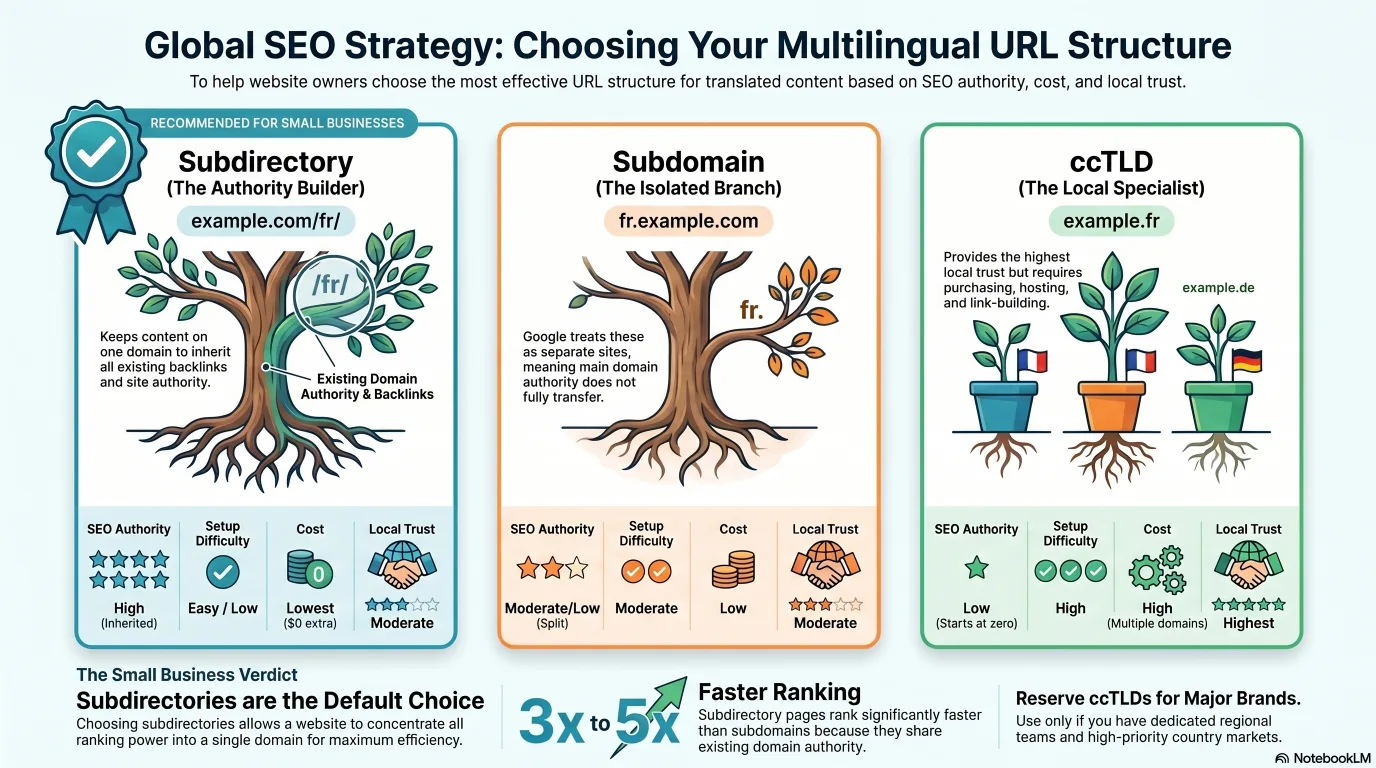
Before you can implement hreflang, though, you have to decide where your translated pages will live. There are three structures, and the choice has real consequences for your international SEO. The comparison below lays them side by side.
| Feature | Subdirectory (subfolder) | Subdomain | ccTLD |
|---|---|---|---|
| Example | example.com/fr/ | fr.example.com | example.fr |
| SEO authority | Strong (shares the root domain's authority) | Moderate (treated as a separate site) | Strong locally, none inherited from the main domain |
| Setup difficulty | Easy | Moderate | Complex |
| Cost | Low (no extra domains) | Medium | High (buy and manage every domain) |
| Local trust signal | Good | OK | Best (strongest country signal) |
| Crawl efficiency | Efficient (one domain to crawl) | Split (each subdomain crawled separately) | Split per domain |
| Google's stance | Default recommendation for most sites | Acceptable | Acceptable |
| Best for | Most SMBs and multi-market expansion | Large enterprises with separate regional teams | Country-specific targeting with real resources |
In plain terms: a subfolder (example.com/fr/) keeps everything on one domain, so every translated page inherits the backlinks and authority your main site has already earned. A subdomain (fr.example.com) is treated by Google more like a separate site, so the authority your main domain built does not fully carry across. A ccTLD (example.fr) sends the strongest possible "this is for France" signal and feels most trustworthy to local users, but you have to buy, host, and build links for each domain separately, which gets expensive fast. SE Ranking research (cited in 2026 industry analysis) found subdirectory pages rank three to five times faster than subdomain equivalents when content quality is held constant, largely because they share the domain's existing authority and are cheaper to maintain. Google's John Mueller has said plainly that "Google web search is fine with using either subdomains or subdirectories," so the decision is yours to make on cost and authority grounds, not on fear of a penalty.
For most small businesses: use subfolders
The Most Common Hreflang Mistakes (and How to Catch Them)
Hreflang fails silently. Nothing breaks visibly; Google simply ignores your tags and serves the wrong language. Here is the error list, worst first.
The cruel thing about hreflang is that it fails quietly. There is no error page, no red warning in your dashboard. The tags just stop working, Google reverts to guessing, and you never find out unless you go looking. The single most common cause is also the most preventable, so it gets a callout of its own.
The #1 hreflang error: missing return tags
That's the headline mistake, but it has a lot of company. The list below pulls together the nine errors that international SEO crawlers flag most often, drawn from Semrush, Search Engine Journal, and the Ahrefs Help Center. None of them are hard to fix once you know to look, which is exactly why a quick audit pays for itself.
- Missing return tags (reciprocal links). Page A references B and C, but B and C don't reference A. Google ignores the tags entirely. Fix: every version points to all versions, including itself.
- Missing self-referencing tag. A page lists the other versions but forgets to include a tag pointing to itself. Search engines may ignore the whole set. Fix: each page's hreflang block must include itself.
- Wrong language or country codes. Using "uk" (which is Ukrainian, not the United Kingdom), or "en-UK" instead of the correct "en-GB". Other classic slips: "ch" is Romansh, not Swiss German (de-CH); "br" is Breton, not Brazilian Portuguese (pt-BR). Fix: language codes use ISO 639-1, country codes use ISO 3166-1 Alpha-2.
- Missing x-default tag. No fallback for users whose language or region you don't specifically target. Fix: add a tag with hreflang="x-default" pointing to a language selector or your most universal page.
- Canonical tag conflicts. Pointing every language version's canonical tag at the English page tells Google not to index the others. Fix: each version gets a self-referencing canonical, not one aimed at another language.
- Relative instead of absolute URLs. Using "/es/page" rather than the full "https://example.com/es/page". Google's rule: alternate URLs must be fully qualified, including the protocol. Fix: always use complete https URLs.
- Region code without a language code. Writing hreflang="US" (region only) instead of "en-US". Country alone is invalid. Fix: always start with the language, then optionally add the region (en-US, fr-CA, es-MX).
- HTTP vs HTTPS mismatch. Some tags use http while the live pages are https. Fix: always use the live, canonical protocol (almost always https in 2026).
- Inconsistent implementation. HTML tags on some pages, sitemap entries on others, HTTP headers on a third set. There is no benefit to mixing methods and it is much harder to manage. Fix: pick one method and apply it consistently across the whole site.
To audit all of these in one pass, use a site-audit crawler (Ahrefs, Semrush, or Screaming Frog all have dedicated hreflang reports), check Google Search Console's International Targeting report, and consider Aleyda Solis' free hreflang tags generator to build correct, reciprocal markup from the start rather than fixing it later.
The reason this matters for a small business is subtle. Many cheap translation plugins promise to "handle hreflang automatically," and many of them do it badly, generating exactly the missing-return-tag errors above because the translated pages live on a structure that isn't cross-referenced correctly. The plugin claims to have solved the problem; in reality it has quietly switched your tags off. A single audit, run once after you publish your translations, is the cheapest insurance in international SEO.
Real Results: The Multilingual SEO Data
Enough theory. Here is what multilingual SEO actually does to traffic and ROI, with named brands and real survey numbers.
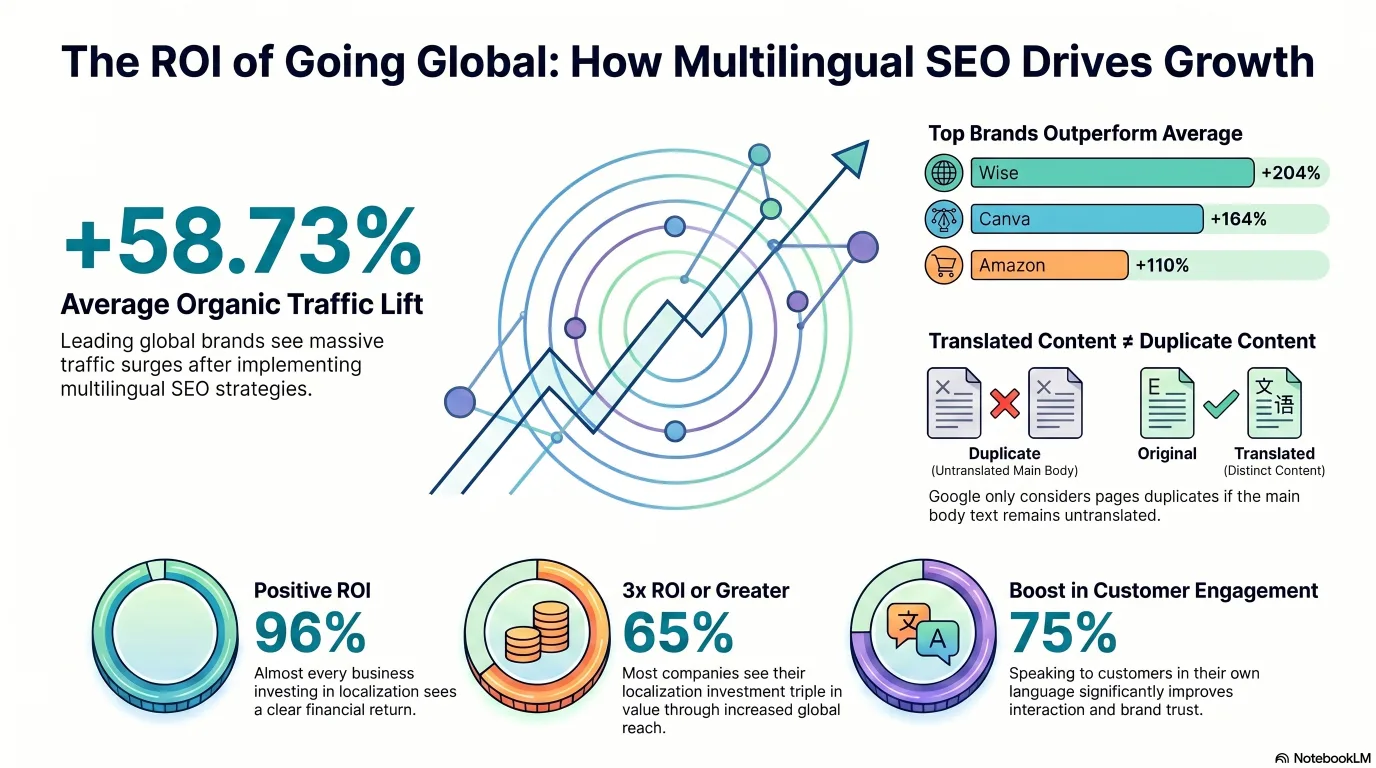
It is fair to ask whether any of this effort pays off, so let's look at the numbers. Ahrefs studied the world's leading brands and found that, on average, they see a lift in organic traffic of over 58% from multilingual SEO. That average hides some spectacular outliers. Wise more than tripled its organic traffic. Canva and Amazon both more than doubled theirs. For Wise and Canva, multilingual SEO now contributes over half of all organic traffic, which is to say it is not a side project for these companies, it is the growth engine.
Organic traffic lift from multilingual SEO, by brand
% increase in total organic traffic attributable to non-English language targeting (Ahrefs, Dec 2024)
Source: Ahrefs, "Multilingual SEO: How Canva, Wise and Amazon Doubled Their Organic Traffic," December 2024. The amber bar is the average across the world's leading brands; the lime bars are the standout performers.
Those are big-brand numbers, and a small business will not replicate a 204% lift overnight. But the direction of travel is the same at every scale, and the return-on-investment data backs it up. DeepL surveyed B2B leaders about localization and the results were lopsidedly positive: 96% reported a positive ROI, 65% reported an ROI of three times or greater, and 75% said localized content meaningfully increased customer engagement. Notably, 98% had already used some form of machine translation in their workflow, which tells you the cost of producing translations has stopped being the obstacle it once was.
Localization ROI: what marketers report
% of surveyed B2B leaders agreeing with each statement (DeepL survey, 2024)
Source: DeepL, "Navigating the Challenges of Content Localization" report, January 2024. The standout figure for a cautious small business is the 96% reporting positive ROI, very few business investments land that consistently in the black.
Put the two charts together and the story is clear. Localization reliably returns more than it costs (96% positive ROI), and when it is done well at scale it can transform organic traffic (a 58.73% average lift, far more for the brands that treat it seriously). The language services industry reaching USD 71.7 billion in 2024, with machine translation and post-editing driving the biggest revenue increase, is the macro version of the same trend: businesses everywhere have decided that speaking to customers in their own language is worth paying for.
The AI-Translation Cost Shift in 2026
Translation used to cost dollars per word. In 2026 it costs cents per page. The barrier didn't disappear, it moved.
The reason localization is suddenly within reach for the smallest business is a quiet revolution in cost. As recently as a few years ago, professional translation ran somewhere around ten cents a word, roughly 200 dollars per million characters. In 2026, machine translation has collapsed that figure. Google's neural machine translation costs about 20 dollars per million characters (with the first 500,000 characters free every month), its newer Gemini-powered mode is similar, and DeepL's Growth tier runs around 32.50 dollars a month for a million characters. The chart below puts the old world next to the new one.
AI translation cost per 1 million characters (2026)
Lower is cheaper. Red is the old human-translation barrier; lime is the new floor (SimpleLocalize, 2026)
Source: SimpleLocalize.io, "How Much Does AI Translation Cost? DeepL, Google Translate, OpenAI Compared," 2026. A mid-sized site of 50,000 to 200,000 characters now costs only one to four dollars to translate with Google NMT.
The implication is liberating and dangerous in equal measure. A small business can now translate a 50-page website into five languages for under ten dollars in raw API costs. The financial barrier that kept localization a big-company privilege is simply gone. But, as we saw earlier, Google can detect low-quality translated content and rank it lower, which means the cost did not vanish so much as move. The new bottleneck is not translating, it is reviewing and localizing what the machine produced.
The smart 2026 workflow reflects this shift. Use AI or machine translation for the first-pass draft, where the cost is now close to zero. Then spend your money where it actually creates quality: a native-speaking reviewer for the localization pass (typically 50 to 200 dollars per language depending on page count), plus a little keyword research in the target language to make sure your titles and headings target the phrases people actually search. The real equation is no longer "200 dollars per language to translate," it is "near-zero to translate, plus a modest amount to review and localize," which still comes in far below the old professional-translation bill. The barrier moved from production to quality control, and quality control is something a careful small business can manage.
Running a Multi-Language Blog as a Team of One
You own the technical setup this article covers. The content-at-scale half is the part automation can genuinely take off your plate.
Here is the honest division of labour for a small business doing multilingual SEO in 2026. The technical setup, hreflang tags, your URL structure, the x-default fallback, the audit that catches missing return tags, stays in your hands. That is the part this article has walked you through, and it is not something you should hand to a plugin and forget. But the other half of the job, actually producing native-sounding content in each target language on a consistent schedule, is exactly the part that used to require a localization team you couldn't afford.
That content-production-at-scale half is where News Factory fits. Its AI agents can research, draft, and publish your articles in up to five target languages (one on Starter, three on Pro, five on Business and Enterprise), so a small team can keep a localized blog active across several markets without hiring a translator for every post. To be clear about the boundary: News Factory handles generating the articles in each language on the cadence you define, while you still own the technical setup this guide covers, the hreflang tags, the URL structure, the x-default. It does not configure hreflang for you, and you shouldn't expect it to. Pair the two, your technical foundation plus automated multilingual content, and a solo operator can credibly run a multi-language content operation that previously needed a whole team.