Why Internal Linking Still Matters in 2026
Three jobs, one hyperlink — and the cheapest SEO lever a small business has.
An internal link is a hyperlink from one page on your website to another page on the same domain. That sounds simple. It is simple. But internal links do three jobs at once: they help Google discover your pages, they tell Google what each page is about through anchor text, and they push ranking authority (PageRank) around your site. They cost nothing, they live entirely inside your CMS, and yet most small business sites under-use them.
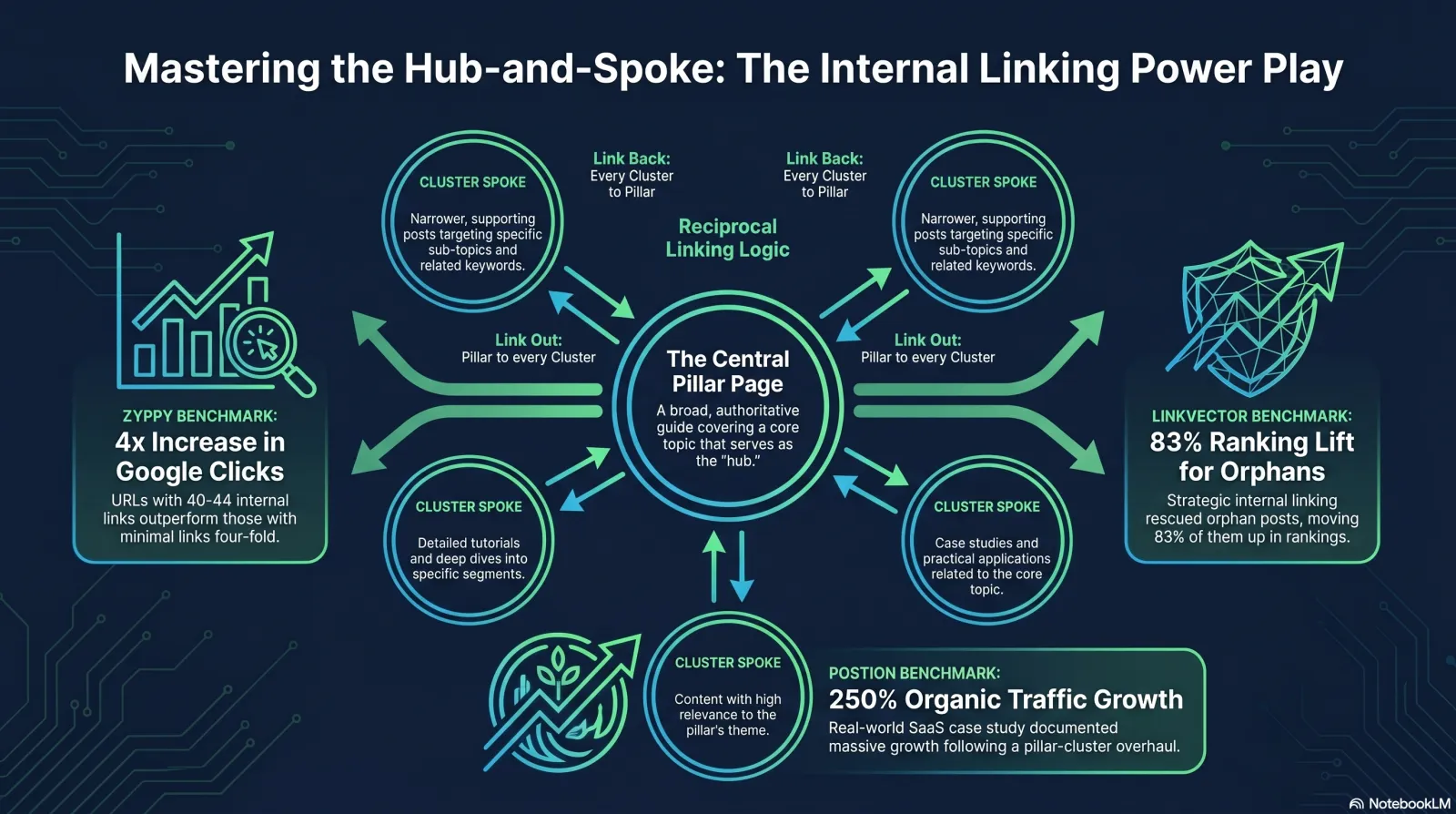
Zyppy's analysis of 23 million internal links across 1,800 websites and roughly 520,000 URLs found that URLs with 40–44 internal links got about 4× the Google clicks of URLs with 0–4 internal links.[9] A LinkVector controlled experiment that added only internal links — no content updates, no on-page changes — moved 83% of 53 orphan posts up in rankings, with six pages hitting #1 and one jumping from position 67 to position 3.[10] A small SaaS team at Postion documented a 250% organic traffic lift in six months from a pillar/cluster internal-link overhaul.[11]
That's the upside. The downside of getting it wrong — orphan pages Google barely crawls, equity locked in your footer, the same anchor pointing at two different cookies pages — is the same SEO drag that's been bleeding small business sites for years, mostly invisibly. The good news: every part of this is fixable in a weekend, with free tools, with no developer. That's what this guide is for.
Crawl budget isn't your problem. Crawl discovery is.
What Google Itself Says About Internal Linking
The single most quotable line in SEO documentation — straight from Search Central.
Google's own documentation is unusually direct on this point. From the official Search Central "Link best practices" page:
"Every page you care about should have a link from at least one other page on your site. Think about what other resources on your site could help your readers understand a given page on your site, and link to those pages in context."— Google Search Central, Link best practices for Google[1]
On the role of links: "Google uses links as a signal when determining the relevancy of pages and to find new pages to crawl."[1]
And on anchor text: "Good anchor text is descriptive, reasonably concise, and relevant to the page that it's on and to the page it links to."[1]
The two named Google voices in the SEO trade press say the same things, on the record. John Mueller, in a Search Console office-hours session, said internal linking is "super critical for SEO. It's one of the biggest things you can do on a website to guide Google and visitors to the pages that you think are important."[3] Mueller has also endorsed the pyramid model directly: "The top-down approach or pyramid structure helps us a lot more to understand the context of individual pages within the site."[3]
Gary Illyes, on the Search team, confirmed in 2017 — and the principle hasn't changed — that internal links pass PageRank. Ahrefs quotes him directly: "Internal links direct the flow of PageRank around your site."[3] Even though Google retired the public PageRank toolbar in 2016, PageRank itself remains a ranking signal.
Why the 2026 stakes are higher, not lower
The AI Overview era has, if anything, raised the value of clear internal-link structure. When a Gemini-powered AI Overview synthesises an answer, it does so from sites it understands deeply — and topical depth is exactly what a tight pillar/cluster internal link graph signals. Yoast frames it concisely:
"Generative AI crawlers rely on context to understand the relationships between expertise and content. A well-structured internal linking strategy helps them connect these dots more accurately."— Yoast, The ultimate guide to internal linking for SEO and GEO[6]
And Semrush's data makes the urgency concrete: the share of commercial queries triggering AI Overviews rose from 8.15% in January 2025 to 18.57% by October 2025, with transactional queries jumping from 1.98% to 13.94% in the same period.[13] The queries small businesses depend on for leads are no longer safe from AI summaries. Being the page Google's AI understands as the authoritative answer in your niche — and that means a clear pillar plus consistent internal links pointing at it — is now a defensive line, not a nice-to-have.
Why structural clarity matters more in 2026: AIO triggers on money queries
Commercial and transactional queries are the new AIO frontier — and internal linking helps your pages be the source AI cites[13]
Source: Semrush AI Overviews study, refreshed Nov 2025. Commercial and transactional triggers nearly tripled in 2025 — the queries small businesses live off are no longer safe from in-place AI answers.
Audit Your Existing Site Structure
Before you add a single new link, find out what's actually there. Three free tools, ninety minutes.
The mistake nearly every small business makes is to skip straight to "add internal links" without ever looking at the link graph that already exists. Don't. The 30-minute audit below tells you where to push and where to stop.
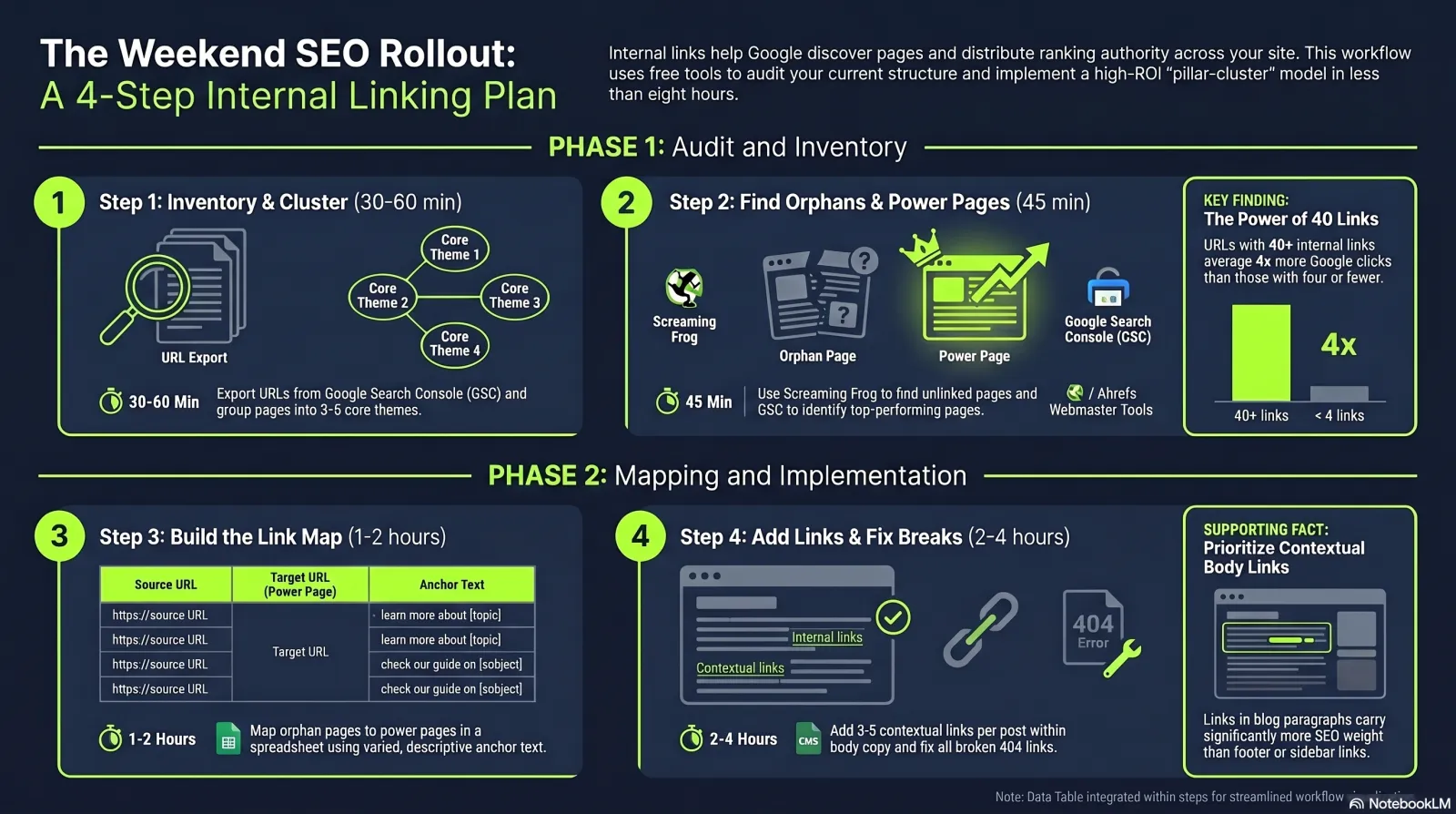
- Pull your page inventory from Google Search Console. Performance → Pages → Export. That's your full known-to-Google URL list. Add a "topic" column in the spreadsheet and tag every page under 3–5 core themes. These themes are your future pillars.
- Find your orphan pages. Run Ahrefs Webmaster Tools (free for verified site owners) or Screaming Frog SEO Spider (free up to 500 URLs — fine for almost every small business site). Use the "0 inlinks" or "Orphan Pages" report. List every important page with zero internal links pointing at it. These are leaking equity from day one.
- Identify your power pages. In GSC Performance, sort Pages by Clicks descending. The top 10–20 are your "power pages" — already-ranking, already-receiving-traffic pages with accumulated authority. These will be the sources for the new internal links you add.
- Map click depth. Screaming Frog has a "Crawl Depth" report. Any important page deeper than 3 clicks from the homepage is a candidate to be promoted (move it under a closer hub page, or link to it from a high-authority page).
Backlinko's recommended cadence: do this audit "one or twice a year."[4] Ahrefs flags three fixable issues from any audit: broken internal links (4XX), orphan pages, and nofollow internal links that shouldn't be.[3]
Internal-link count vs. clicks (Zyppy, 23M internal links)
More inbound internal links correlate with more clicks — up to ~45 per page, after which the effect reverses[9]
Cyrus Shepard / Zyppy: "More internal links are associated with higher traffic, but only to a point." The sweet spot for site-wide inbound internal links is roughly 40–44 per important page. For per-post outbound links, the rule of thumb is 3–5 contextual links per blog post.
The Hub-and-Spoke (Topic Cluster) Pattern
The single most-recommended modern internal linking framework. Moz, Ahrefs, Backlinko, Yoast all converge.
Topic clusters — also called hub-and-spoke, or the pillar/cluster model — are the single most-recommended modern internal linking framework. They work like this:
- Pillar page: one long, broad guide covering a core topic ("Email marketing for small businesses").
- Cluster pages: narrower posts that cover sub-topics ("Best email subject lines for 2026", "Email open rate benchmarks by industry", "Free email templates by use case").
- Linking rule: every cluster page links up to the pillar; the pillar links down to every cluster.
Moz puts the logic plainly: "Topic clusters help you rank for multiple variations of a topic. You focus your pillar on a broad keyword and use supporting pages to target thematically related keywords. Internal links in a topic cluster follow a clear logic: pillar links to cluster, and cluster links to pillar."[5] Search Engine Land treats topic clusters as standard practice in its dedicated guide.[8]
A concrete cluster example
| Pillar | Cluster page | Link direction |
|---|---|---|
| Email marketing for small businesses (pillar) | Best email subject lines 2026 (cluster) | Cluster → pillar (with anchor "email marketing for small businesses"). Pillar → cluster inside the "Subject lines" section. |
| Email marketing for small businesses (pillar) | Email open rate benchmarks by industry (cluster) | Cluster → pillar. Pillar → cluster from the "Benchmarks" section. Sideways links between subject-line and open-rate clusters where relevant. |
| Email marketing for small businesses (pillar) | Free email templates by use case (cluster) | Cluster → pillar. Pillar → cluster from the "Templates" section. Avoid linking templates ↔ benchmarks unless context demands it. |
| Local SEO for service businesses (separate pillar) | Google Business Profile optimisation (cluster) | Two pillars: avoid heavy cross-linking between unrelated pillars; preserves topical clarity. |
Two practical guardrails. First, don't cross-link aggressively between unrelated pillars. If you have a pillar on email marketing and another on local SEO, only link between them when the context genuinely demands it — otherwise you blur topical signals. Second, keep every important page within three clicks of the homepage. Ahrefs lists this as best-practice #1: "Plan your site structure using a pyramid hierarchy; keep every page within three clicks of the homepage."[3] John Mueller endorsed the same model: the pyramid "helps us a lot more to understand the context of individual pages within the site."[3]
The highest-ROI internal-linking tactic for a small site
Case-study uplift from internal-link-only projects
Three independent case studies, no content changes — just internal links
Sources: Postion (pillar/cluster, 6 months), LinkVector (3-month controlled experiment on orphan pages), Zyppy (23M-link correlation study), seoClarity (ecommerce categories). Internal linking is one of the few SEO levers where measured uplifts from "links only, no content change" experiments are this consistent.
Not all internal links carry the same weight
Ahrefs, referencing Google's "reasonable surfer" model, ranks internal link placements by SEO value:
"Highest value: Links in your main content body. These are contextual, editorial, and positioned where engaged readers will actually click. Medium value: Navigation and breadcrumbs. Lowest value: Footer links and deep sidebar content."— Ahrefs, Internal Links for SEO[3]
Internal-link placement value (relative weight)
The same URL passes very different equity depending on where you put it
Translation for small business owners: a link inside a blog paragraph is worth substantially more than the same link in the footer or a related-posts widget. Move topical links into body copy; reserve footers for navigation essentials.
Backlinko's own testing adds: "Putting internal links towards the top of your page can reduce your bounce rate and improve dwell time."[4] Place your most important internal links early — above the fold, in your opening paragraphs — not buried at the end of the article.
Anchor Text: What Works, What Doesn't
Descriptive, varied, not over-optimised — and never the same anchor for two different pages.
Anchor text is the visible, clickable text inside a hyperlink. Google's own guidance:
"The better your anchor text, the easier it is for people to navigate your site and for Google to understand what the page you're linking to is about."— Google Search Central, Link best practices[1]
The single most important data point on internal anchor text comes from Zyppy's 23M-link study: "URLs with a larger number of anchor text variations from internal links are highly correlated with more Google search traffic."[9] Pages with at least one exact-match anchor had at least five times more traffic than pages without one. But the same study showed the strongest correlation was with variety — not exact-match saturation.
Practical anchor patterns
| Practice | Good example | Bad example |
|---|---|---|
| Describe the destination page | Read our full list of cheese types | Click here / Read more / This article |
| Vary the anchor across pages | "local SEO basics", "on-page local optimisation", "Google Business Profile guide" — all to the same page | The same anchor text on every page that links to it |
| Keep it reasonably concise | 2026 schema markup guide | Click here to read this comprehensive long guide we wrote about schema markup |
| Use natural keyword variants — don't over-optimise | Roughly half partial-match, sprinkle of exact, some branded, some naked URL | Every internal link uses the destination page's exact target keyword |
| Never use one anchor for two different pages | "grain-free chocolate chip cookies" → one URL; "low-carb chocolate chip cookies" → another | Both pages linked with "chocolate chip cookies" |
Backlinko adds the nuance for internal (vs external) anchors: "You can get away with using some exact match anchor text in your internal links. Google has said in the past that using lots of exact match anchor text in internal links won't 'typically' hurt you. But I like to stay on the safe side. That's why I mix up my internal link anchor text quite a bit."[4] The rule for a small site: roughly half partial-match, a sprinkle of exact, some branded, a few naked URLs. Variety is the goal, not exact-match maximisation.
The grain-free vs low-carb cookies trap
Common Mistakes Small Businesses Make
Nine traps — most of them invisible until you actually crawl the site.
| Mistake | Why it hurts | Fix |
|---|---|---|
| Orphan pages (zero inbound internal links) | Google barely crawls them; they pass and receive no PageRank. They effectively don't exist in the index hierarchy. | Add at least one contextual inbound link from a power page. Run Screaming Frog "0 inlinks" report quarterly. |
| Pages buried 5+ clicks deep | Crawled and ranked less than pages within 3 clicks of the homepage (Ahrefs / Backlinko / Mueller). | Flatten via hub pages. Every important page within 3 clicks of the homepage. |
| Same generic anchor for everything ("click here") | Loses topical signal; Google explicitly recommends descriptive anchors over generic ones. | Use the destination page's keyword in the anchor naturally — e.g. "see our list of cheese types" not "click here". |
| One anchor pointing to two different pages | Confuses Google about which page deserves the ranking (Backlinko's grain-free vs low-carb cookies example). | Audit anchors with Screaming Frog "Internal Anchor Text" report. One canonical anchor phrase per destination URL. |
| Footer/sidebar link dumping | Lowest-weight placements; dilutes equity passed by your higher-value contextual links. | Keep footers to navigation essentials. Move topical links into body copy. |
| Broken internal links to deleted pages | Wastes PageRank; users hit 404s. Ahrefs case: a single removed post left 37 dead internal links. | Quarterly: remove the source link or 301-redirect the destination URL. |
| Never going back to link from older posts | New posts arrive as orphans inside their topic cluster, while older relevant content keeps all the equity. | Add a publishing-checklist step: "List 3 older posts that should link to this one." Then go add the links. |
| Nofollowing internal links by accident | Many SEO plugins auto-nofollow external links and mis-apply the rule internally — quietly capping link equity flow. | Audit with Screaming Frog → Internal → Status. Set internal links to dofollow by default. |
| Fully automated internal-linking plugins on autopilot | Backlinko: "ignores users… [risks] anchor text spam… 1,000+ exact-match anchor text links overnight." | Use plugins for suggestions, not auto-insertion. Keep a human in the loop for anchor variety. |
"Link sculpting" refers to the practice — popular in the late 2000s — of strategically nofollowing some internal links to concentrate PageRank flow into the pages you cared about most. Google explicitly closed that loophole around 2009: nofollow on an internal link no longer redirects PageRank to other links on the page; it simply discards that portion of equity.
For 2026 the rule is: keep internal links dofollow by default. The only legitimate reasons to nofollow an internal link are login pages, user-generated content sections where you can't vouch for the destination, and certain affiliate links — and even those are edge cases. Ahrefs lists "Nofollow internal links" as a fixable audit issue: "keep internal links dofollow by default."[3]
The related myth: that "too many" internal links on a page will trigger a penalty. Google has been clear: there's no fixed cap, but each additional link does dilute the equity each one passes. Ahrefs' rule of thumb: "For a typical article, 3–5 contextual links work well alongside your standard navigation. Every link on a page dilutes the value passed through the others — a page with 100 links passes roughly 1/100th of its equity through each one."
Practical translation: don't sculpt, don't fear quantity within reason, don't over-link. The bigger risk for small sites is under-linking and the orphan-page problem, not over-linking.
Your 4-Step Weekend Rollout Plan
A small business owner with no developer can do this in a weekend, using only free tools.
This is the minimum-viable version of everything above. A single weekend, three free tools (Google Search Console, Ahrefs Webmaster Tools, Screaming Frog), and one spreadsheet.
| Step | Time | What you do |
|---|---|---|
| 1. Inventory & cluster | 30–60 min | In Google Search Console → Performance → Pages, export your full URL list. Add a column for "topic" and group every page under 3–5 core themes. Those are your future pillar pages. |
| 2. Find orphans + power pages | 45 min | Run Ahrefs Webmaster Tools (free) or Screaming Frog (free up to 500 URLs). Pull the "0 inlinks" report. Then in GSC sort Pages by Clicks descending — your top 10–20 are your power pages. |
| 3. Build the link map | 1–2 hours | Open a spreadsheet: From URL | To URL | Anchor text. For each orphan page, pick 1–3 relevant power pages and write a contextual, varied anchor. For each pillar, list every cluster page to link up and back. |
| 4. Add links + fix broken ones | 2–4 hours | In WordPress/Shopify/Wix, edit each source page and drop the link inside a real sentence — not the footer. Aim for 3–5 contextual links per blog post. Fix any 4XX internal links from the same audit. Re-submit your sitemap and re-audit in 6 months. |
Two follow-ups after the weekend. Fix broken internal links. From the same crawl, find "Internal → 4XX". Remove the source link or 301-redirect the destination. Ahrefs reports a single removed blog post in one of their audits left 37 dead internal links behind. Re-submit your sitemap and monitor. In GSC, re-submit. After 2–4 weeks, check the Links report: are previously-orphan pages now showing inbound internal links? Track rankings of the affected pages in GSC Performance. Re-audit every six months.
Where News Factory fits in the picture
Tools That Actually Help
What to use, what it costs, what each one does — sorted by smallest budget first.
| Tool | Cost | What it does |
|---|---|---|
| Google Search Console | Free | The "Links" report shows your top internally-linked pages and top linking pages. Indispensable starting point. |
| Ahrefs Webmaster Tools | Free for verified site owners | Limited Site Audit + Site Explorer. Surfaces orphan pages, broken internal links, anchor distribution. |
| Screaming Frog SEO Spider | Free up to 500 URLs (£199/yr unlimited) | Desktop crawler — the gold standard for finding orphan pages, redirect chains, and broken internal links. |
| Yoast SEO (WordPress) | Free; Premium ~$99/yr | Suggests internal links while writing; manages cornerstone-content tagging for pillars. |
| Link Whisper (WordPress) | From $77/yr | Suggests and inserts internal links automatically with anchor-text control. Use suggestions, keep human review. |
| Ahrefs (paid) | From $129/mo | Full Site Audit, Internal Link Opportunities report, Page Explorer with link-depth visualization. |
| Semrush | From $139.95/mo | Site Audit, Backlink Analytics, Topic Research / Topic Clusters tool. |
| Sitebulb | From $13.50/mo | Visual crawler with strong internal-link-depth and crawl-path reports. |
For a small business on zero budget, the answer is unchanged from five years ago: Google Search Console + Ahrefs Webmaster Tools + Screaming Frog free tier. That stack will surface every orphan page, every broken internal link, every redundant anchor, and every important page buried deeper than 3 clicks from your homepage. The paid tools are nice; they aren't required.
The honest summary in three sentences
Internal linking is the highest-leverage, lowest-cost SEO tactic available to small businesses in 2026 — and the one most often skipped, because the upside is invisible until you crawl your own site and see how many orphan pages you're shipping every quarter. The rules haven't changed since 2018: descriptive anchor text, vary it across pages, contextual links over footer links, pillar plus cluster, every important page within 3 clicks, no orphans. What has changed is the cost of doing it badly — because AI Overviews now reward sites with clear topical structure and quietly demote the ones without it.
→ Do this now: Open Google Search Console, run Performance → Pages → sort by Clicks descending. Your top 5 pages are your power pages. Pick three orphan pages you wish ranked. From each power page, add one contextual internal link to one of those orphans — with a real, descriptive anchor written into a real sentence. That's your first weekend's homework. The rest of the playbook follows from there.
Related reading
- Topical Authority: Why Publishing More (Good) Content Wins SEO — the cadence that fills out a pillar/cluster structure.
- Technical SEO for Non-Developers — schema markup, canonical tags, redirects, and the other technical foundations every small site needs alongside good internal linking.
- GA4 + Search Console for Small Businesses — how to actually find your power pages and track post-audit improvements.
- AI Overviews & SGE: How Small Sites Can Still Win Clicks — why structural clarity is now defensive, not optional, in the AIO era.